Website Session Recording Tools, Tracking and CRO Tips
Website session recording guide covering 5 tools, click tracking, scroll tracking, form signals, CRO use cases and privacy checks.
Zunnun Ahmed · Published · 8 min read
Website session recording is a behavior analytics method that reconstructs visitor clicks, scroll movement, form interactions, page navigation and replay timing from tracking code events, giving digital analytics teams a visual record of how users experience a website before they convert or leave.
Session replay belongs inside a focused web analytics stack, beside GA4 event tracking, heatmap analysis, funnel analysis and consent management. The method turns interaction data into replayable sessions, so teams review a page experience, identify friction points and connect behavior patterns to conversion rate optimization work.
What Is Website Session Recording?
Table of Contents
- What Does It Capture?
- What User Behavior Signals Does It Track?
- What Are the Main Tools and Platforms?
- How Does It Help Conversion Rate Optimization?
- What Are the Business Benefits and Use Cases?
- Does Website Session Recording Capture Clicks on a Page?
- Can Website Session Recording Track Scroll Behavior?
- Does Website Session Recording Work on Mobile Devices?
- Is Session Replay the Same as Website Session Recording?
- Can You Filter Session Recordings by Page or Device?
Website session recording is event-based playback of a visitor's website session, built from interaction data such as clicks, scrolls, cursor movement, page changes and form behavior, so analysts review user journeys without recording the visitor's physical screen or private desktop activity.
The tracking code collects browser-side events and rebuilds them as a replay inside a session recording platform. Session replay, visitor recording and user session recording describe the same digital analytics capability in most product pages.
Website recordings support UX review, conversion analysis and quality assurance by showing where the user hesitates, repeats actions, misses a call to action, encounters a broken element or leaves a funnel step.
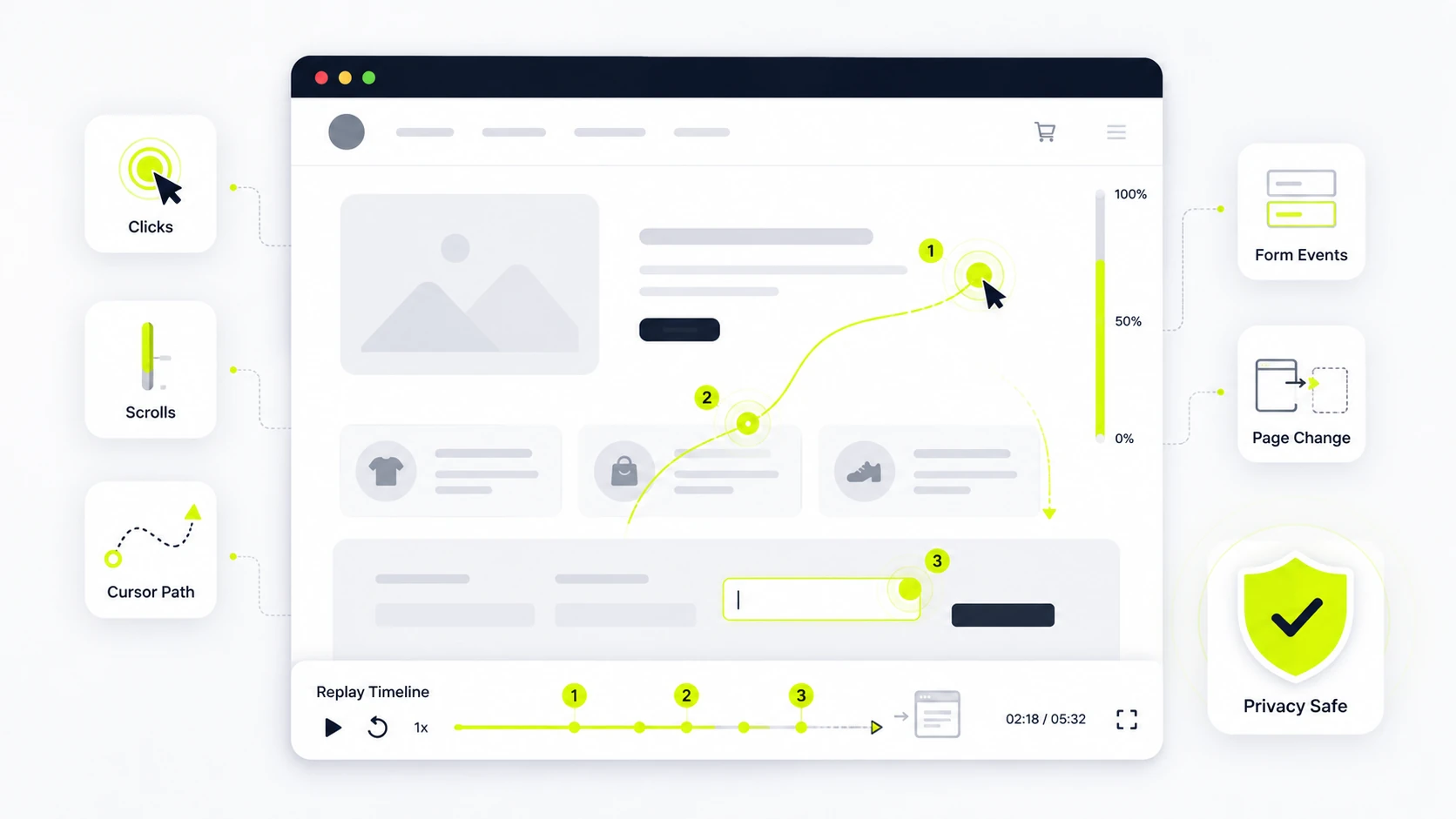
What Does It Capture?
Website session recording captures interaction events from the page layer, including click activity, scroll depth, pointer movement, form behavior, navigation changes, technical errors, device context and session timing that explain how the visitor moved through a site during one recorded session.
The main captured elements are listed below.
- Clicks and taps on buttons, links, menus, cards and inactive elements
- Scroll movement, viewport depth and repeated up-down movement
- Mouse movement, cursor pauses and hover patterns on desktop sessions
- Form field focus, field changes, validation errors and abandonment points
- Page navigation, URL changes, session duration and device context
Privacy controls mask sensitive form values, payment fields, passwords and personal data when the platform is configured correctly.
What User Behavior Signals Does It Track?
Website session recording tracks behavior signals that expose intent, confusion, friction, repeated actions and drop-off risk, using click tracking, scroll tracking, form tracking, heatmaps and session replay markers to show what a user tried to do on each page.
The main behavior signals are grouped below.
|
Signal |
What the Signal Shows |
|
|---|---|---|
|
Rage clicks |
Repeated clicks on the same element signal frustration or a broken interaction. |
|
|
Dead clicks |
Clicks on non-clickable content signal visual affordance problems. |
|
|
Scroll depth |
Low scroll depth signals weak content engagement or above-the-fold mismatch. |
|
|
Form abandonment |
Field exits and validation loops signal conversion friction. |
|
|
Cursor movement |
Pauses and repeated movement signal reading behavior or uncertainty. |
These signals turn raw event tracking into user journey analysis, because each replay connects behavior to a page path, device type and funnel stage.
What Are the Main Tools and Platforms?
The main website session recording platforms include Microsoft Clarity, Hotjar, FullStory, Mouseflow, Smartlook, Lucky Orange and Contentsquare, with each tool covering replay depth, heatmaps, filters, privacy controls, event search, segmentation, integrations and behavior analytics for marketing, product, UX and CRO workflows.
The seven session recording tools below summarize common platform choices for behavior analytics and conversion rate optimization.
- Microsoft Clarity: Free session replay suits teams that need recordings, heatmaps, rage click markers, dead click markers and basic filters without advanced event search controls.
- Hotjar: Marketing and UX teams use Hotjar for recordings, heatmaps, feedback widgets, surveys and funnel context across landing pages and checkout flows during campaign reviews.
- FullStory: Product teams use FullStory for deeper behavior analytics, event search, segmentation, journey analysis and issue detection across complex web applications for session-level replay evidence.
- Mouseflow: CRO teams use Mouseflow for session recordings, heatmaps, form analytics, funnel reports and feedback tools focused on conversion friction and checkout diagnosis during CRO tests.
- Smartlook: Web and mobile product teams use Smartlook for session replay, event tracking, funnels, heatmaps and app recording with device-level context for app product review.
- Lucky Orange: Small business and ecommerce teams use Lucky Orange for recordings, heatmaps, live chat, surveys and conversion funnels for one behavior analytics and feedback workspace.
- Contentsquare: Enterprise teams use Contentsquare for session replay, journey analysis, zoning analysis, performance insights and behavior scoring across high-traffic digital products and enterprise optimization workflows.
Tool choice depends on privacy controls, session volume, mobile support, integration needs, sampling rules and the depth of event search required by the analytics team.
How Does It Help Conversion Rate Optimization?
Website session recording helps conversion rate optimization by showing the user behavior behind funnel leaks, so CRO teams connect drop-off, rage clicks, form abandonment, scroll depth, dead clicks and layout hesitation to specific page elements before changing layouts or tests.
Session replay supports CRO work in these ways.
- It shows why a landing page receives traffic but loses users before the form.
- It reveals broken buttons, hidden calls to action, confusing field labels and validation loops.
- It connects qualitative user behavior to quantitative GA4 events, heatmaps and funnel reports.
- It supports A/B testing by showing which page variant reduces friction during the same conversion path.
- It gives product, design and marketing teams a shared record of the page problem.
The result is a tighter measurement loop: recording review produces a hypothesis, analytics confirms the affected segment and testing measures the change.
What Are the Business Benefits and Use Cases?
Website session recording gives businesses practical evidence for UX debugging, support diagnosis, onboarding review, checkout optimization, campaign landing page improvement, issue reproduction and journey analysis, because the replay shows the exact interaction sequence behind a failed task or completed conversion.
Common business benefits and use cases are listed below.
- UX debugging: Session recordings expose confusing navigation, unresponsive elements, layout shifts and mobile rendering problems that standard aggregate reports hide during page review.
- Checkout optimization: Replay analysis isolates cart abandonment, validation errors, payment hesitation and hidden shipping concerns before teams change checkout fields or run tests.
- Support investigation: Support teams use visitor recordings to reproduce reported bugs, verify browser context and separate user confusion from technical defects accurately.
- Onboarding analysis: Product teams review new-user sessions to find setup pauses, repeated clicks, skipped guidance and abandonment during account activation flow steps.
- Campaign review: Marketing teams compare recordings by UTM source, landing page, device and campaign to identify message mismatch after ad clicks quickly.
The strongest use case combines session recordings with GA4 key events, UTM tracking, consent mode status and funnel analysis, because the replay shows behavior while analytics shows scale.
Does Website Session Recording Capture Clicks on a Page?
YES, website session recording captures clicks, tap events, clicked elements, replay timestamps and page context, so analysts see where a visitor interacted with buttons, links, menus, cards, icons, filters, accordions, navigation items, embedded widgets and inactive page areas during playback.
Click tracking also records dead clicks and rage clicks when the platform supports behavior markers.
Can Website Session Recording Track Scroll Behavior?
YES, website session recording tracks scroll depth, viewport position, repeated scrolling and page exposure, so analysts see how far users move through a page, where attention slows, where page sections receive visibility and where content engagement drops during a session.
Scroll tracking works best when reviewed with heatmaps, landing page type, device size and conversion path.
Does Website Session Recording Work on Mobile Devices?
YES, website session recording works on mobile web sessions and selected native app sessions, depending on platform support, tracking code placement, app SDK availability, privacy settings, device sampling rules, replay storage limits, consent configuration, mobile event capture and app instrumentation.
Mobile recordings show taps, scroll behavior, responsive layout problems, form friction and navigation issues that desktop replays miss.
Is Session Replay the Same as Website Session Recording?
YES, session replay and website session recording usually describe the same replayable visitor recording feature, with both terms referring to reconstructed user sessions built from browser events, DOM snapshots, page-state data, interaction metadata, viewport changes, device context and timing records.
Product pages also use visitor recording, user session recording and website recordings for the same behavior analytics function.
Can You Filter Session Recordings by Page or Device?
YES, session recordings filter by page path, device type, browser, country, traffic source, events, errors, referrer, session duration, user type, landing page, campaign source and conversion status when the platform includes segmentation, event search, replay controls and saved audience views.
Useful filters isolate mobile checkout issues, landing page friction, returning-user behavior and sessions with form abandonment, while a dedicated metrics channel checks landing page performance against broader traffic patterns.
Website session recording sits inside a broader digital analytics stack: tracking code captures clicks, scroll depth, form interactions and mobile behavior, then converts them into replayable sessions for website data tracking, CRO analysis and conversion path review. Privacy settings, consent configuration and session filters determine which recordings stay useful.

Written by
Zunnun Ahmed
Digital analytics consultant helping businesses make data-driven decisions. Specializing in GA4, GTM, conversion tracking, and marketing attribution to turn messy data into profitable growth strategies. Semantic SEO expert in the Koray Tuğberk Gübür methodology.