Digital Analytics: Data, Metrics, Methods and Reporting
Digital analytics tracks user behavior, campaigns and conversions across websites, apps and ads to guide reports, tools and strategy.
Zunnun Ahmed · Published · 27 min read
What Is Digital Analytics?
Table of Contents
- How Does Digital Analytics Differ From Data Analytics?
- How Does Digital Analytics Differ From Web Analytics?
- Why Is Digital Analytics Important?
- What Data and KPIs Should You Track?
- How Do You Implement Digital Analytics?
- Which Digital Analytics Tools Should You Use?
- How Should You Analyze Digital Analytics Data?
- How Should Google Ads Data Be Used in GA4 for Analysis?
- How Can Facebook Ads Data Be Analyzed in GA4?
- How Can Conversion Funnel Performance Be Analyzed in GA4?
- How Can Device Performance Be Analyzed in GA4?
- How Can Landing Page Performance Be Analyzed in GA4?
- How Can Email Campaign Performance Be Analyzed in GA4?
- How Can Organic Search Performance Be Analyzed in GA4?
- What Makes an Analytics Report Actionable?
- What Makes Digital Analytics Misleading?
Digital analytics is a measurement discipline that collects, organizes, validates and interprets digital interaction data for business decisions. Data sources include websites, mobile apps, advertising platforms, ecommerce systems, customer relationship management (CRM) records and product event streams.
The digital analytics process includes four main stages:
- Collection: Tags, software development kits (SDKs), server-side events and application programming interfaces (APIs) record defined user and system interactions.
- Measurement: Metrics convert event records into counts, rates, values and time-based comparisons.
- Analysis: Funnels locate step loss, cohorts compare behavior after a shared starting point, segments expose group differences and experiments compare outcomes under controlled exposure.
- Interpretation and action: Data-quality checks, business context and named ownership connect an observed result to a defined decision.
How Does Digital Analytics Differ From Data Analytics?
Digital analytics focuses on data generated by digital interactions across websites, apps, campaigns, ecommerce systems and connected customer journeys, while data analytics covers a broader range of business data, including finance, operations, sales, support and other organizational datasets.
The main distinction is scope:
| Attribute | Digital Analytics | Data Analytics |
|---|---|---|
| Scope | Digital interactions and journeys | Any business dataset |
| Common sources | Websites, apps, advertising platforms, ecommerce systems and CRM data | Databases, warehouses, files, surveys and operational systems |
| Typical questions | Where do users engage, convert, exit or return? | What happened, why did it happen and what patterns exist? |
| Common outputs | Funnels, cohorts, channel reports and conversion analysis | Models, forecasts, operational reports and statistical analysis |
How Does Digital Analytics Differ From Web Analytics?
Digital analytics covers multiple digital touchpoints, while web analytics focuses on activity occurring on websites. Web analytics measures website traffic, navigation, engagement and conversions. Digital analytics extends that measurement across apps, advertising platforms, ecommerce systems, CRM records and product interactions.
The main differences are:
| Attribute | Digital Analytics | Web Analytics |
|---|---|---|
| Measurement scope | Cross-platform digital activity | Website activity |
| Common data | Web, app, campaign, product, ecommerce and CRM data | Pages, sessions, referrals, website events and conversions |
| Analysis | Acquisition, journeys, conversion, retention and attribution | Traffic, landing pages, navigation, engagement and website funnels |
| Decision use | Cross-channel and customer journey decisions | Website performance decisions |
Why Is Digital Analytics Important?
Digital analytics is important because it turns digital interaction data into evidence for marketing, product, ecommerce and customer journey decisions while identifying measurement problems that can make reported performance unreliable.
Digital analytics supports several decision areas:
- Journey diagnosis: Funnel events identify where users leave forms, onboarding flows and checkout processes.
- Marketing evaluation: Traffic source, campaign cost, conversions and attributed value support channel performance analysis.
- Conversion measurement: Events connect purchases, form submissions, bookings and other outcomes with preceding interactions.
- Customer analysis: Segments and cohorts reveal differences in acquisition, behavior, retention and customer value.
- Product analysis: Activation events and feature usage show how users interact with digital products.
- Measurement validation: Testing identifies missing events, duplicate events, incorrect parameters and discrepancies between systems.
- Reporting accountability: Defined metrics, comparison periods, owners and review dates connect findings with specific business decisions.
What Data and KPIs Should You Track?
Track acquisition, behavior, conversion, value and retention data that connects digital activity to defined business outcomes. KPIs measure progress toward the objectives, targets and decisions assigned to that data.
The main data and KPI groups include:
Acquisition: Track source, medium, campaign, landing page and advertising cost. KPIs include customer acquisition cost, cost per qualified lead and channel conversion rate.
Behavior: Track page views, screen views, events, form interactions and feature usage. KPIs include engagement rate, activation rate and funnel completion rate.
Conversion: Track purchases, form submissions, bookings, registrations and qualified leads. KPIs include conversion rate, purchase rate and qualified lead rate.
Value: Track transaction IDs, revenue, order values, refunds and CRM sales outcomes. KPIs include revenue, average order value, revenue per user and return on ad spend.
Retention: Track returning activity, repeat purchases, renewals, cohort activity and cancellations. KPIs include retention rate, repeat purchase rate and churn rate.
Measurement quality: Track event timestamps, consent states, session identifiers and transaction IDs. Validation checks identify missing events, duplicate events and discrepancies between analytics and source systems.
How Do You Implement Digital Analytics?
Digital analytics is implemented by auditing the existing measurement setup, defining requirements, documenting the tracking plan, configuring data collection, validating the implementation and maintaining measurement after launch.
7 implementation process includes:
- Audit the current setup: Review analytics platforms, tag management, existing events, conversions, consent signals, data layers, integrations and known data discrepancies.
- Define measurement requirements: Document business goals, KPIs, reporting users, decision questions and the digital journeys that require measurement.
- Create the tracking plan: Define event names, trigger conditions, parameters, accepted values, data layer fields, consent requirements, reporting destinations, testing methods and owners.
- Implement data collection: Configure tracking through GTM, SDKs, server-side events, APIs, direct integrations or application code. Include cross-domain tracking and conversion deduplication where required.
- Validate the implementation: Test tags, events, parameters, consent states, transaction IDs and complete user journeys using preview tools, DebugView, real-time reports and test conversions. Check for missing and duplicate events.
- Connect reporting and activation systems: Send validated data to GA4, advertising platforms, CRM systems, data warehouses and dashboards according to the measurement plan.
- Complete handoff and governance: Document event mappings, QA evidence, implementation notes, owners and change history. Revalidate tracking after website, app, consent or campaign changes.
What Should a Tracking Plan Include?
A tracking plan includes the event definition, business purpose, trigger condition, parameters, data source, reporting destination, validation method and owner for each tracked interaction. It becomes the reference for implementation, QA, reporting and future tracking changes.
The main tracking plan fields include:
Business purpose: Define the business question, KPI or reporting requirement the event supports.
Event definition: Record the approved event name and the exact user or system action it represents.
Trigger condition: Specify when the event fires, including required conditions, exclusions and page or journey context.
Parameters: List required parameters, accepted values, formats and identifiers such as form_id, product_id, value, currency and transaction_id.
Data source: Identify whether each value comes from the data layer, page markup, application code, API, ecommerce platform or backend system.
Reporting destination: Map the event to GA4 events and key events, Google Ads conversion tracking tags, dashboard fields and other required reporting systems.
Identity and attribution: Document client, session, user and transaction identifiers, plus cross-domain requirements where a journey moves between domains or platforms.
Consent and deduplication: Define required consent states and the identifiers used to prevent duplicate browser, server or purchase events.
Validation method: Record how the event is tested in GTM Preview, Tag Assistant, GA4 DebugView, Realtime reports or test transactions.
Ownership and change history: Assign an implementation owner, record QA evidence and update the tracking plan when website, app or measurement logic changes.
Which Digital Analytics Tracking Method Is Most Reliable?
A hybrid tracking setup that combines browser-side and server-side collection provides the strongest measurement architecture for many digital implementations. Browser tracking records interactions at the website or app, while server-side tracking adds controlled event routing, conversion delivery and first-party data handling.
A reliable setup includes:
- Browser-side collection: Captures page views, clicks, form interactions, ecommerce events and consent signals.
- Server-side collection: Sends validated events from a controlled server endpoint to analytics and advertising platforms.
- Cross-domain continuity: Preserves client, session and attribution information when users move between websites, ecommerce platforms or checkout domains.
- Deduplication: Uses transaction IDs or event identifiers to prevent browser and server conversions from being counted twice.
- Source-system validation: Compares analytics conversions and revenue with ecommerce, CRM or backend records.
- Ongoing QA: Revalidates events, parameters and identifiers after website, checkout or tracking changes.
In one ecommerce implementation, I found that an embedded Shopify checkout was changing the GA4 client and session identifiers between the WordPress website and Shopify checkout. This could cause purchases to lose their original acquisition source and appear as Direct traffic.
I recommended changing the checkout journey and validating cross-domain measurement so the same user and session context could continue into the purchase flow.
“When I investigate attribution problems, I first verify whether the client ID, session ID and transaction data remain consistent across the full journey. In cross-domain ecommerce tracking, preserving that continuity is critical for reliable source and revenue reporting.” — Zunnun Reza
Which Digital Analytics Tools Should You Use?
Digital analytics tools should be selected by the measurement function they perform across data collection, tag management, behavior analysis, product analytics, data storage and reporting. A complete analytics stack combines connected tools instead of relying on one platform for every measurement requirement.
The main digital analytics tools include:
Google Analytics 4 (GA4): Measures website and app users, sessions, events, acquisition, key events, ecommerce activity and attribution.
Google Tag Manager (GTM): Manages tags, triggers, variables and data layer-based event tracking across websites and digital platforms.
Mixpanel and Amplitude: Analyze product events, funnels, cohorts, activation, retention and feature adoption.
Microsoft Clarity: Provides session recordings, heatmaps and interaction signals for behavioral analysis.
BigQuery: Stores event-level data for SQL analysis, validation, longer-term retention and joins with advertising, ecommerce or CRM data.
Looker Studio: Combines analytics, advertising, search and business data into dashboards for KPI monitoring and recurring reporting.
Advertising and CRM platforms: Google Ads, Microsoft Ads, Meta and CRM systems provide campaign cost, conversion, lead status, customer value and offline outcome data.
Server-side tracking tools: Server-side GTM and platforms such as Stape route first-party events, support conversion APIs and extend browser-based tracking architectures.
“I do not rely on GA4 as the only analytics platform. I use Mixpanel alongside GA4 as a secondary measurement layer to validate events, funnels and user behavior when tracking or reporting results need further verification.” — Zunnun Reza
How Do You Choose an Analytics Platform?
Choose an analytics platform based on the data you need to collect, the questions you need to answer, the systems you need to connect and the level of analysis your team requires. Tool selection should follow measurement requirements rather than brand popularity.
Evaluate the platform against these criteria:
Measurement scope: Confirm whether the platform supports websites, apps, ecommerce, product events or multiple digital touchpoints.
Event model: Review how it handles events, parameters, user properties, sessions and custom dimensions.
Analysis requirements: Check support for funnels, cohorts, segmentation, retention, attribution and exploratory analysis.
Data ownership and access: Confirm export options, raw event access, APIs and data warehouse integrations.
Integration requirements: Verify compatibility with tag managers, advertising platforms, CRM systems, ecommerce platforms and reporting tools.
Privacy and consent: Review consent controls, data retention settings, regional processing requirements and user-level data handling.
Reporting needs: Confirm whether the platform supports operational dashboards, custom reports and the reporting frequency required by the business.
Implementation effort: Consider setup complexity, developer requirements, maintenance workload and the skills available within the team.
Cost and scale: Compare pricing against event volume, user volume, data retention, feature access and expected growth.
How Should You Analyze Digital Analytics Data?
Analyze digital analytics data by identifying the performance change, tracing the user journey, investigating user behavior, validating business outcomes and combining trusted data in a central analytics data warehouse. The consolidated dataset can then support AI-assisted analysis, insights and visualization.
A practical analysis workflow includes:
- Start with GA4: Identify changes in acquisition, landing pages, users, sessions, key events, ecommerce activity, revenue and attribution.
- Trace the journey in Mixpanel: Analyze event sequences, funnels, completion rates, drop-offs, cohorts and retention.
- Investigate behavior in Microsoft Clarity: Review heatmaps and session recordings for pages or journey steps where quantitative data shows friction or unusual behavior.

- Validate against source systems: Compare purchases, revenue, qualified leads and customer outcomes with ecommerce, CRM and advertising platform data.
- Centralize data in an analytics data warehouse: Use BigQuery as the central analytics data warehouse for GA4, advertising, CRM, ecommerce and other validated datasets.
- Add an AI analysis layer: Connect governed warehouse data to AI tools to summarize changes, detect patterns, compare segments, investigate anomalies and generate questions for deeper analysis.
- Create insights and visualizations: Present validated KPIs, trends, funnels, channel performance and AI-assisted findings through Looker Studio or another business intelligence platform.
- Validate AI findings: Check important AI-generated observations against the underlying queries, source systems and metric definitions before using them for business decisions.
The complete workflow is:
GA4 → Mixpanel → Microsoft Clarity → Source-system validation → BigQuery → AI analysis → Looker Studio → Business decision
“My preferred workflow is to use GA4 for overall performance, Mixpanel for event and funnel analysis and Microsoft Clarity for behavioral investigation. I then combine validated data in BigQuery, use AI to investigate patterns and surface insights and visualize the final findings in Looker Studio.” — Zunnun Reza
When Should You Use Funnels, Cohorts or Segmentation?
Use funnels to measure progression through defined steps, cohorts to compare groups over time and segmentation to explain differences between users, sessions or events.
Funnels: Use them to measure step completion and drop-off across journeys such as landing page → form start → submission or cart → checkout → purchase.
Cohorts: Use them to compare users who share a starting point, such as signup or first purchase, and measure retention or repeat behavior over time.
Segmentation: Use it to compare performance by source, campaign, device, landing page, geography or customer type.
How Should Google Ads Data Be Used in GA4 for Analysis?
Google Ads data in GA4 should be used to connect advertising cost and traffic with onsite behavior, key events and revenue. After Google Ads and GA4 are linked, GA4 can report campaign, ad group, keyword and search-query dimensions alongside Ads clicks, cost, CPC, key events, cost per key event, ROAS and total revenue.
A practical analysis follows this sequence:
- Start with Google Ads performance: review campaign spend, clicks, CPC, conversions and ROAS.
- Check traffic in GA4: compare sessions, engaged sessions and landing-page performance for Google Ads traffic.
- Review conversion behavior: analyze GA4 key events such as generate_lead, begin_checkout and purchase.
- Segment the decline: break results down by campaign, ad group, keyword, search query, device and landing page.
- Identify the driver: determine whether the problem comes from traffic cost, traffic quality, website behavior, conversion rate or revenue per conversion.
- Take an action: adjust bids, search terms, campaign allocation or landing pages based on the identified driver.
- Validate the result: compare CPA, key event rate, revenue and ROAS after the change.
Practical Example
Assume a Google Ads campaign records $2,000 spend and 1,000 ad clicks, but ROAS falls compared with the previous period.
GA4 analysis shows:
- Google Ads sessions remain relatively stable.
- Landing-page engagement declines.
- begin_checkout events fall from 40 to 25.
- Purchases fall from 20 to 11.
- Revenue falls while advertising spend remains similar.
The analysis indicates that traffic volume is not the primary problem. Users are still reaching the website, but fewer users progress from the landing page to checkout and purchase.
The next analysis should compare:
- Landing pages by campaign
- Mobile versus desktop behavior
- Search queries and keywords
- Engagement rate
- begin_checkout rate
- Purchase rate
- Revenue per purchaser
If one landing page shows a sharp decline in purchase rate, the action focuses on that page rather than reducing the entire Google Ads budget.
A useful reporting statement becomes:
Finding: Google Ads spend remained stable, but GA4 purchase activity and revenue declined.
Driver: The largest decline occurred between landing-page sessions and begin_checkout.
Action: Review the affected landing page, device segments and search-query quality before changing campaign budgets.
Validation: Measure key event rate, purchases, CPA and ROAS after the change.
GA4 therefore adds the post-click behavior layer to Google Ads reporting. Google Ads shows how advertising generated traffic and cost, while GA4 shows what those users did after arriving on the website.
How Can Facebook Ads Data Be Analyzed in GA4?
Facebook Ads data can be analyzed in GA4 by using UTM parameters to identify paid Facebook traffic and then comparing that traffic with website behavior, key events and revenue.
A practical analysis can include:
- Sessions from Facebook paid traffic
- Landing pages used by each campaign
- Engagement rate
- Key events such as generate_lead, begin_checkout or purchase
- Conversion rate
- Revenue
- Device performance
- Campaign performance based on UTM values
For example, Meta Ads may show that a campaign generated many clicks, but GA4 may show that those users had low engagement and few purchases.
The analysis can then become:
Finding: Facebook Ads generated strong click volume.
GA4 check: Paid Facebook traffic produced low engagement and few purchase events.
Diagnosis: The campaign generated traffic, but website conversion performance was weak.
Action: Review the landing page, audience, ad message and device performance.
Validation: Compare sessions, key events, conversion rate and revenue after the changes.
Using Facebook Ads data with GA4 adds the post-click behavior layer to reporting. Meta shows what happened with the ad, while GA4 shows what users did after reaching the website.
How Can Conversion Funnel Performance Be Analyzed in GA4?
Conversion funnel performance in GA4 can be analyzed by comparing how many users complete each step and where the largest drop-off occurs.
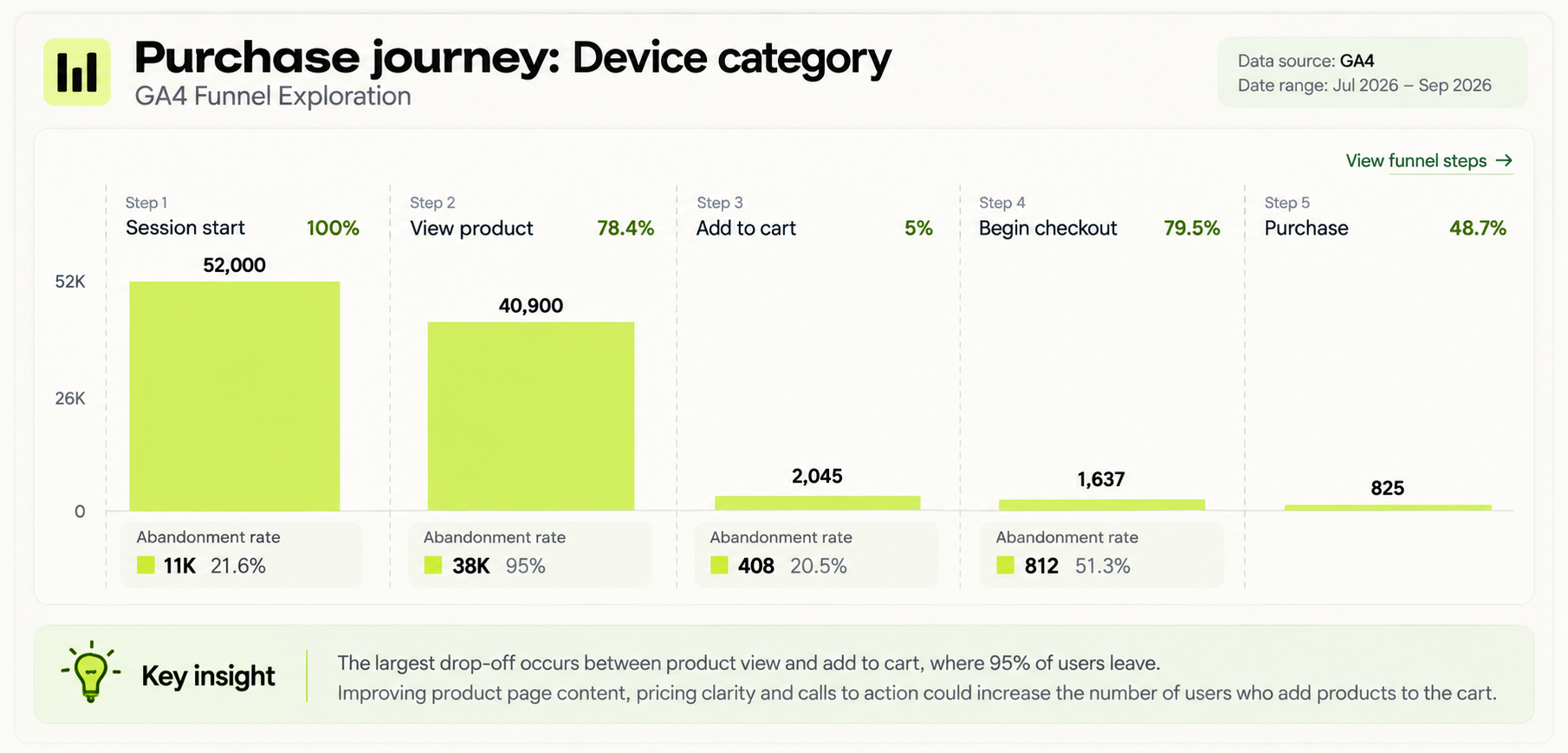
For an ecommerce funnel, the main steps may include:
- view_item
- add_to_cart
- begin_checkout
- purchase
For example:
- 1,000 users trigger view_item
- 300 trigger add_to_cart
- 180 trigger begin_checkout
- 90 complete purchase
This shows:
- View item to add to cart: 30%
- Add to cart to checkout: 60%
- Checkout to purchase: 50%
- Overall view item to purchase rate: 9%
The largest issue in this example appears between view_item and add_to_cart, where 70% of users leave without adding the product to the cart.
The next analysis can segment the funnel by:
- Traffic source or medium
- Campaign
- Landing page
- Device category
- New versus returning users
- Country or region
For example, if Google Ads traffic reaches checkout at a similar rate to other channels but has a much lower purchase rate, the analyst can review checkout behavior, device performance and conversion tracking before changing campaign budgets.
The reporting output can follow this structure:
Finding: 180 users started checkout but only 90 completed a purchase.
Drop-off: 50% of checkout users did not reach the purchase event.
Segment: Mobile users recorded the largest checkout-to-purchase decline.
Action: Review the mobile checkout experience and validate purchase event tracking.
Validation: Compare checkout completion rate and purchases after the change.
Funnel analysis turns GA4 event data into a clear report showing where users stop converting and which part of the customer journey requires investigation.
How Can Device Performance Be Analyzed in GA4?
Device performance in GA4 can be analyzed by comparing desktop, mobile and tablet users across traffic, engagement, key events, conversion rate and revenue.
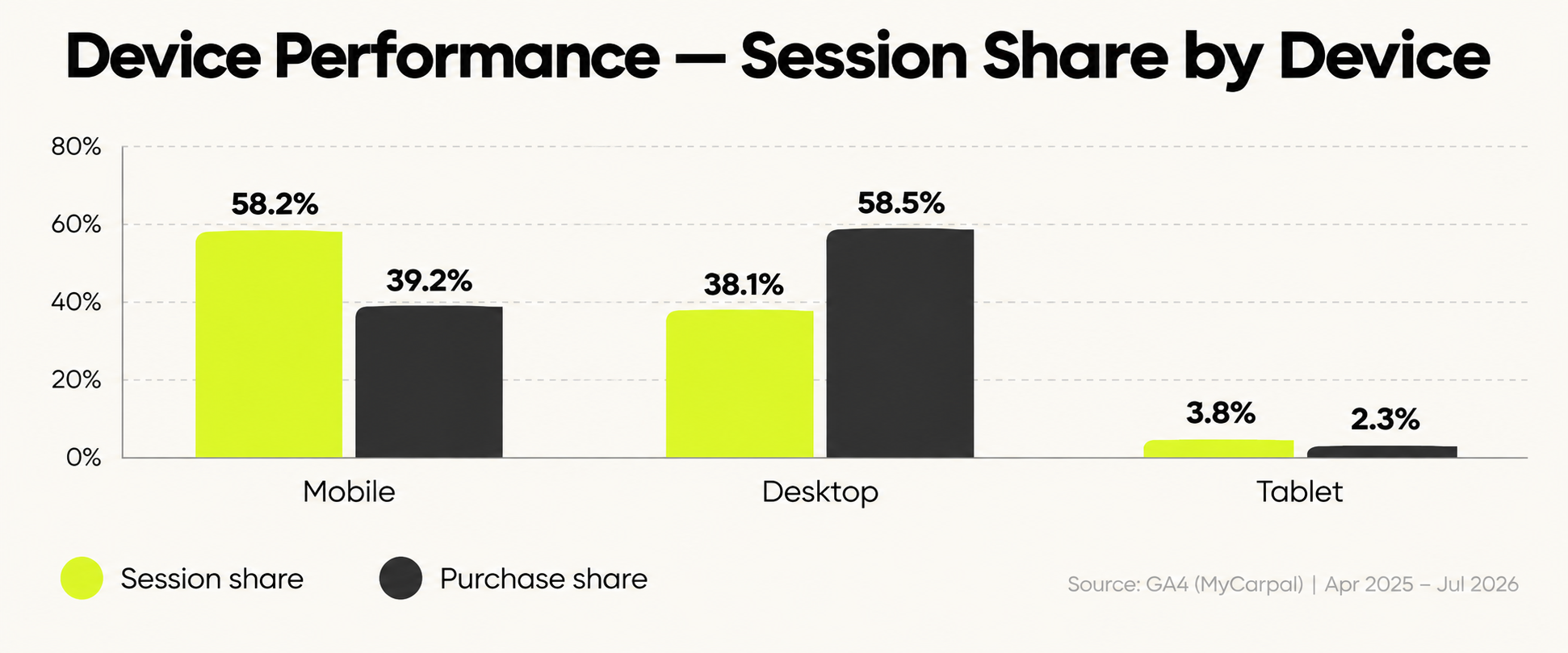
A practical device report can compare:
- Users and sessions
- Engagement rate
- Average engagement time
- Key events
- Session key event rate
- Purchases
- Purchase conversion rate
- Revenue
For example:
- Mobile: 5,000 sessions, 100 purchases and a 2.0% purchase rate
- Desktop: 2,000 sessions, 80 purchases and a 4.0% purchase rate
- Tablet: 300 sessions, 6 purchases and a 2.0% purchase rate
Mobile generates the most traffic, but desktop converts at twice the rate. This indicates that traffic volume alone does not explain performance.
The next analysis can compare device performance by:
- Traffic source or medium
- Campaign
- Landing page
- Browser
- Operating system
- Funnel stage
For example, if mobile users reach begin_checkout at a similar rate to desktop users but complete fewer purchase events, the analyst can investigate mobile checkout usability, page performance and purchase tracking.
The reporting output can follow this structure:
Finding: Mobile generated the highest traffic volume but a lower purchase rate than desktop.
Segment: The largest difference appeared during checkout completion.
Diagnosis: Mobile users progressed into checkout but completed purchases at a lower rate.
Action: Review mobile checkout behavior, page performance and purchase-event tracking.
Validation: Compare mobile purchase rate, completed purchases and revenue after the changes.
Device analysis helps an analytics report show which devices generate traffic, which convert efficiently and where device-specific performance problems require investigation.
How Can Landing Page Performance Be Analyzed in GA4?
Landing page performance in GA4 can be analyzed by comparing traffic, engagement, key events, conversion rate and revenue for each page where a session begins.
A practical landing page report can compare:
- Sessions
- Engaged sessions
- Engagement rate
- Average engagement time
- Key events
- Session key event rate
- Purchases
- Purchase conversion rate
- Revenue
For example:
- Landing Page A: 3,000 sessions, 180 key events and a 6.0% key event rate
- Landing Page B: 2,200 sessions, 66 key events and a 3.0% key event rate
- Landing Page C: 1,000 sessions, 80 key events and an 8.0% key event rate
Landing Page C receives less traffic but produces the highest key event rate. Landing Page B attracts more traffic but converts at a lower rate.
The next analysis can segment landing pages by:
- Source or medium
- Campaign
- Device category
- New versus returning users
- Country or region
- Key event type
For example, if a paid campaign sends most of its traffic to Landing Page B but that page has a lower key event rate than other pages, the analyst can review message match, page content, form behavior and mobile performance before increasing ad spend.
The reporting output can follow this structure:
Finding: Landing Page B generated high traffic but a lower key event rate than other landing pages.
Segment: Paid traffic accounted for most sessions to the page.
Diagnosis: Traffic volume was strong, but fewer users completed the intended action.
Action: Review campaign-to-page message match, form completion behavior and device performance.
Validation: Compare key event rate, conversions and revenue after the page changes.
Landing page analysis helps an analytics report identify which entry pages attract traffic, which convert efficiently and which require further investigation or optimization.
How Can Email Campaign Performance Be Analyzed in GA4?
Email campaign performance in GA4 can be analyzed by using UTM parameters to identify each email source, campaign and link, then comparing traffic, engagement, key events and revenue.
A practical email report can compare:
- Sessions
- Engaged sessions
- Engagement rate
- Key events
- Session key event rate
- Purchases or leads
- Revenue
- Landing page performance
- Device performance
UTM parameters commonly include:
- utm_source
- utm_medium
- utm_campaign
- utm_content
For example:
- Campaign A: 2,000 sessions, 120 key events and a 6.0% key event rate
- Campaign B: 1,500 sessions, 45 key events and a 3.0% key event rate
- Campaign C: 800 sessions, 64 key events and an 8.0% key event rate
Campaign C generates the least traffic but the highest key event rate. Campaign B produces more sessions but weaker conversion performance.
The next analysis can segment email traffic by:
- Campaign
- Landing page
- Email link or CTA
- Device category
- New versus returning users
- Key event type
For example, if an email campaign generates a high number of sessions but few generate_lead or purchase events, the analyst can review landing-page relevance, CTA placement, device behavior and campaign message match.
The reporting output can follow this structure:
Finding: Campaign B generated strong traffic but a lower key event rate than other email campaigns.
Segment: Most low-converting sessions came from mobile users.
Diagnosis: Email traffic reached the website, but fewer users completed the intended action.
Action: Review the mobile landing page, CTA placement and email-to-page message match.
Validation: Compare sessions, key event rate, conversions and revenue after the changes.
Email campaign analysis helps an analytics report show which campaigns generate traffic, which drive business outcomes and where campaign or landing-page performance requires investigation.
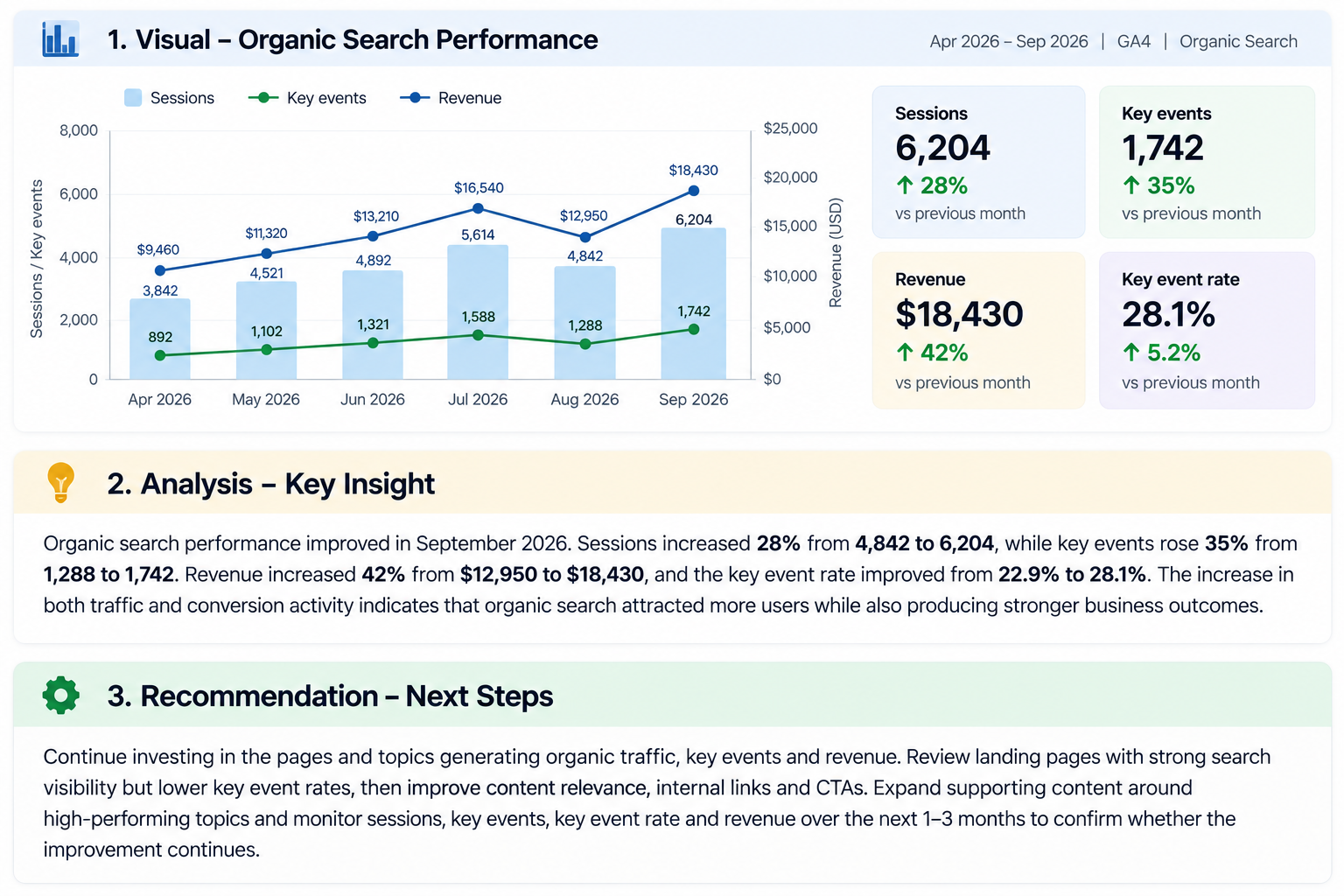
How Can Organic Search Performance Be Analyzed in GA4?
Organic search performance in GA4 can be analyzed by combining Google Search Console search data with GA4 landing-page behavior, key events and revenue.
A practical organic search report can compare:
- Google Search clicks
- Impressions
- Click-through rate
- Average position
- Organic sessions
- Engaged sessions
- Engagement rate
- Key events
- Session key event rate
- Purchases or leads
- Revenue
For example:
- Page A: 1,500 Google Search clicks, 1,300 organic sessions and 65 key events
- Page B: 1,200 clicks, 1,050 sessions and 21 key events
- Page C: 600 clicks, 540 sessions and 54 key events
Page C attracts less organic traffic but generates a stronger key event rate. Page B receives more search traffic but converts fewer users.
The next analysis can segment organic performance by:
- Landing page
- Search query
- Device category
- Country
- New versus returning users
- Key event type
For example, if Search Console shows rising clicks for a landing page but GA4 shows falling key event rate and revenue, the issue is not necessarily search visibility. The page may be attracting less-qualified traffic or performing poorly after users arrive.
The reporting output can follow this structure:
Finding: Organic clicks increased, but key event rate declined.
Search Console check: The landing page gained more clicks from Google Search.
GA4 check: Organic sessions increased, but fewer users completed key events.
Diagnosis: Search visibility improved, but post-click conversion performance weakened.
Action: Review query intent, landing-page relevance, CTA performance and device behavior.
Validation: Compare organic sessions, key event rate, conversions and revenue after the changes.
Combining Search Console with GA4 helps an analytics report show which search queries and landing pages attract traffic and whether that traffic produces meaningful business outcomes.
What Makes an Analytics Report Actionable?
An analytics report is actionable when it connects a performance change to its target, driver, business impact, recommended action and validation metric. The report explains what happened, where it happened and what decision follows from the data.
A practical reporting sequence is:
Target → Performance change → Segment → Driver → Business impact → Action → Owner → Validation
An actionable report includes:
- Target or benchmark: Compare performance against a previous period, CPA target, ROAS target, conversion target or other business objective.
- Performance change: State exactly what increased or decreased, including the percentage or absolute difference.
- Segment: Identify where the change occurred by campaign, channel, landing page, device, location, audience or funnel stage.
- Driver: Use supporting metrics to explain what contributed to the change.
- Business impact: Connect the movement to revenue, leads, acquisition cost or another business outcome.
- Recommended action: Specify the campaign, page, tracking setup or user journey that requires investigation or adjustment.
- Priority and owner: Record which action comes first and who is responsible for it.
- Validation metric: Define the KPI and comparison period used to measure whether the action worked.
- Data-quality note: Document attribution differences, tracking gaps, low sample sizes or missing data before making a decision.
Practical Example
A Microsoft Ads report showed that ROAS fell from 1.02x to 0.55x, while spend remained nearly unchanged.
Further analysis found that Search conversions fell from 10 to 6 and Search revenue declined from $1,450.91 to $741.35.
GA4 can then check Bing paid traffic by landing page, device and funnel events to determine whether the decline occurred after the ad click.
The report can present the finding as:
Target: Improve advertising efficiency against the defined ROAS target.
Finding: ROAS declined from 1.02x to 0.55x.
Segment: Search produced most of the decline.
Driver: Search generated four fewer conversions and $709.56 less revenue.
Business impact: Similar advertising spend generated substantially less revenue.
Action: Review search terms, landing-page performance, device behavior and conversion tracking before changing the overall budget.
Priority: Investigate Search performance first because it produced the largest revenue decline.
Validation: Compare conversions, CPA, revenue and ROAS in the next reporting period.
Data check: Confirm GA4 and Microsoft Ads conversion tracking before attributing the decline entirely to campaign performance.
An actionable analytics report therefore answers what changed, where it changed, why it matters, what happens next and how the result will be measured.
What Makes Digital Analytics Misleading?
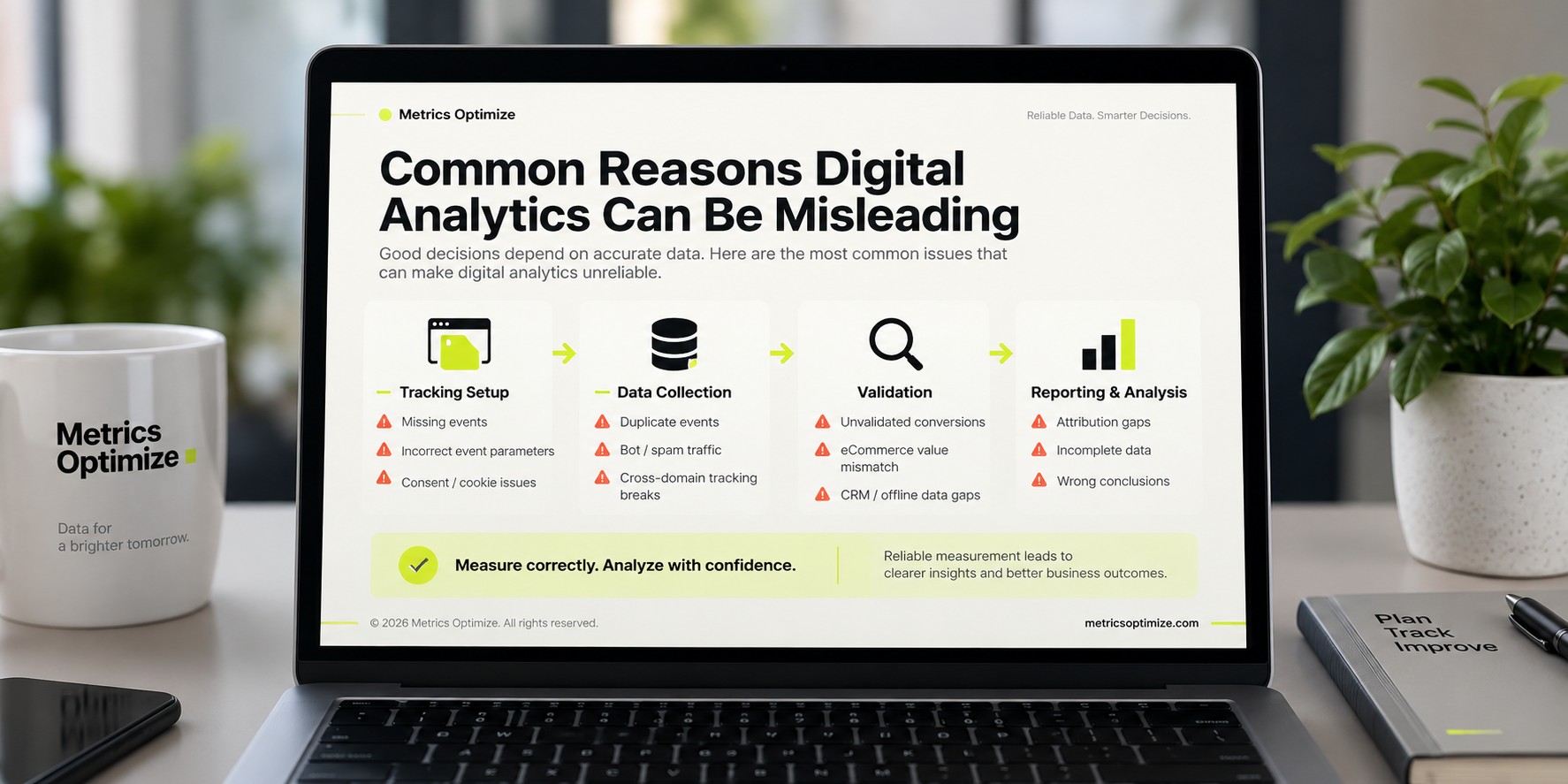
Digital analytics becomes misleading when collection errors, inconsistent event definitions, identity limitations, reporting mistakes or invalid traffic cause reported metrics to misrepresent actual user behavior or business outcomes. Reliable analysis requires the analyst to validate how the data was collected, what each metric represents and whether the reported result matches the underlying business system.
Can Small Teams Reduce Analytics Errors With a Measurement Plan?
Yes. Small teams can reduce analytics errors by using a focused measurement plan, a limited set of business KPIs, documented event definitions and routine tracking QA.
The measurement plan should document the event name, business purpose, trigger condition, required parameters, accepted values and reporting destination. This creates one reference point for implementation and reporting instead of allowing each team member to interpret events differently.
For example, a team may use generate_lead for one form while another form is reported as form_submit. If both represent the same business outcome but are treated differently in reporting, lead totals become difficult to compare.
A practical QA process can check events in GTM Preview, GA4 DebugView and Realtime reports before changes are published. The same checks should be repeated after website, form, checkout or tag-management changes.
Can Missing User Identity Make Analytics Incomplete?
Yes. Missing persistent user identity can make user-level analytics incomplete because the same person may appear as multiple users across browsers, devices or sessions.
Analytics can still measure sessions, events, conversions and revenue without collecting names or email addresses. The limitation appears when the analysis requires one person's activity to be connected across multiple touchpoints.
For example, a customer may research a product on a mobile phone and complete the purchase later on a desktop computer. Without a permitted persistent identifier, those interactions may be reported as separate users.
Consent choices, cookie deletion and browser restrictions can create additional breaks in user continuity. Analysts should therefore avoid treating reported user counts as a perfect count of individual people.
Does Autocapture Replace Defined Analytics Events?
No. Autocapture does not replace defined analytics events because automatically collected interactions do not automatically contain the business meaning required for analysis.
An autocapture platform may record button clicks, page views, form interactions or navigation behavior. The analyst still needs to determine which interaction represents a lead, purchase, signup, checkout step or another business outcome.
For example, recording every button click does not show which button represents a qualified lead. A documented event such as generate_lead can define the trigger, form identifier, lead type and reporting destination.
Autocapture is therefore useful for behavioral investigation, while a measurement plan provides the controlled event definitions required for consistent KPI reporting.
Can Spreadsheet-Based Reporting Create Analysis Errors?
Yes. Spreadsheet-based reporting can create analysis errors when manual exports, formulas, date ranges or metric definitions are not controlled consistently.
For example, a monthly performance workbook may become inaccurate when:
- A formula stops before newly added rows.
- One worksheet reports users while another reports sessions.
- A copied table retains the previous reporting period.
- Campaign values are pasted into the wrong row.
- Revenue is refreshed while advertising cost remains from an earlier export.
These problems can produce mathematically correct calculations from incorrect or incomplete inputs.
A practical spreadsheet QA check should confirm the source platform, reporting dates, metric definition, row range, formulas and refresh date before the report is distributed.
Spreadsheets remain useful for analytics when their data sources, formulas and update procedures are documented and validated.
Can Analytics Recover Events That Were Never Collected?
No, not from the analytics platform alone. If an interaction was never recorded, the original event-level data generally cannot be recreated later.
For example, implementing begin_checkout today does not generate accurate begin_checkout events for users who reached checkout last month.
Historical business outcomes may still be available from another system. Shopify may contain completed orders, a CRM may contain submitted leads and backend logs may contain transactions even when the corresponding GA4 event was missing.
The distinction is important:
Source-system records may recover the business outcome, but they do not recreate website interactions that were never measured.
When a tracking gap is identified, the analyst should document the affected date range so historical reports are not interpreted as if measurement had been complete.
Can Bot Traffic Distort Analytics?
Yes. Bot and other automated traffic can distort analytics when non-human activity is recorded as sessions, page views, events or conversions.
For example, sessions may suddenly increase by 60% while qualified leads and revenue remain unchanged. Reporting the increase as audience growth would be misleading without investigating the source of the additional traffic.
A practical investigation can compare:
- Source and medium
- Referral source
- Landing page
- Country or region
- Device and browser
- Engagement behavior
- Key events
- Revenue or qualified leads
- Traffic patterns over time
An unusual increase concentrated in one source, location or repeated behavioral pattern requires further validation before it is treated as genuine customer growth.
Bot-related traffic should therefore be evaluated against business outcomes and supporting traffic dimensions, not sessions alone.

Written by
Zunnun Ahmed
Digital analytics consultant helping businesses make data-driven decisions. Specializing in GA4, GTM, conversion tracking, and marketing attribution to turn messy data into profitable growth strategies. Semantic SEO expert in the Koray Tuğberk Gübür methodology.