Website Data Tracking Code: Setup, Events and QA
Website data tracking code guide covering tags, pixels, events, consent, QA, attribution and reports for accurate analytics setup.
Zunnun Ahmed · Published · 14 min read
Website data tracking code records visitor activity through scripts, tags, pixels, tracking IDs, triggers and data layer values so analytics and marketing platforms measure behavior, conversions and campaign performance. The guide explains the code snippet, its source-code placement, the event chain behind reports and the privacy controls that govern data collection.
What is a website data tracking code?
Table of Contents
- Why do websites use tracking codes?
- How does a website tracking code work?
- Where is tracking code placed?
- How do you install tracking code?
- What data can tracking codes collect?
- How do cookies and consent affect tracking code?
- How does tracking code measure user behavior?
- How does tracking code measure conversions?
- How do tracking codes support attribution?
- How are multiple tracking codes managed?
- How do you verify tracking code?
- What privacy rules apply to tracking code?
- What reports do tracking codes enable?
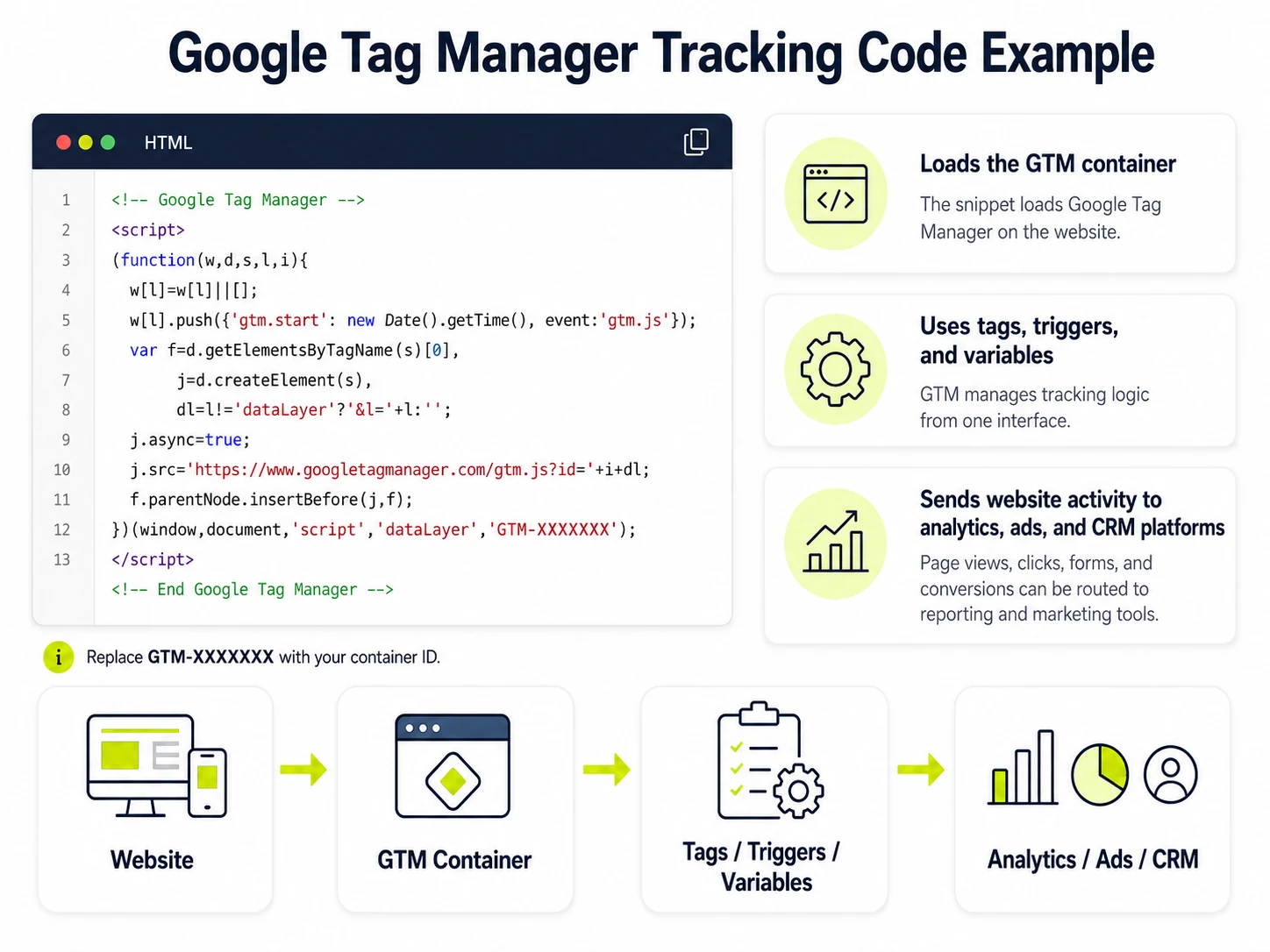
A website data tracking code, tag, pixel is a JavaScript snippet, pixel or tag added to a website to collect visitor activity and send it to analytics, advertising or CRM platforms. The same entity appears in search results as a tracking script, analytics tracking code, website tracking code or site tracking code. The snippet usually sits in the HTML source code, a CMS tracking field or a tag management system. Its value comes from the visitor activity it records: page views, clicks, sessions, form activity, conversions and campaign identifiers.
Why do websites use tracking codes?
Websites use tracking codes to measure traffic, user behavior, conversions, campaign performance and audience activity across analytics and marketing platforms. The code turns browser actions into structured measurement records. Those records support web analytics, marketing analytics, retargeting, A/B testing and conversion reporting.
The main reasons websites use tracking codes are listed below.
- Measure page views, sessions and engagement in an analytics property
- Connect campaigns to landing-page visits and conversion events
- Create retargeting audiences from visitor actions
- Compare experiment variants through recorded test events
- Detect measurement gaps, broken triggers and duplicate events
How do tracking codes support retargeting?
Tracking codes support retargeting by recording visitor actions that ad platforms use to build audiences and show follow-up ads. A Meta Pixel code or social pixel can record a product-page view, add-to-cart action or completed purchase. The ad platform maps that event to an audience rule and campaign objective.
How do tracking codes support A/B testing?
Tracking codes support A/B testing by recording which page version users saw and which actions they completed after exposure. The experiment tool or analytics property compares conversion rate, engagement event and user action data by page version. The measurement layer records test exposure before the conversion event is evaluated.
How does a website tracking code work?
A website tracking code works by loading a script or pixel, firing on a page view or event, collecting parameters and sending the data to a reporting platform. The browser, page source, tag manager and analytics endpoint each handle one part of the measurement path.
A website tracking code usually works through the following sequence.
- The browser loads the page and reads the script tag, tracking pixel or GTM container snippet.
- The tag fires on a page load, click, form submission, purchase or consent update.
- The tracking ID or measurement ID routes the hit to the correct account, property, pixel or container.
- Event parameters describe the action, page path, source, medium, campaign, value or item.
- The platform endpoint receives the request and stores it for analytics reports, dashboards and attribution models.
What are tracking IDs and parameters?
Tracking IDs identify the account or container receiving data, while parameters describe the event, page, source, campaign or user action being measured. Examples include a GA4 measurement ID, Meta Pixel ID, GTM container ID, UTM parameter, event name, page path and conversion value. The ID controls destination. The parameter controls context.
What are tracking-code triggers?
Tracking-code triggers are rules that decide when a tag fires, such as a page view, click, form submission, purchase or consent update. A page view trigger fires on load. A click trigger fires after a matching selector or link condition. A purchase trigger fires after the order confirmation event.
What are data layer variables?
Data layer variables are structured values that pass page, product, user, order or event details from the website to a tag manager. A data layer can hold product ID, order value, event name, login state, page type and consent status. GTM variables read those values and pass them to analytics tags.
Where is tracking code placed?
Tracking code is usually placed in the HTML head, site-wide header, tag manager container or platform tracking field, depending on the tool's installation instructions. Google tag instructions commonly use the head area. Some CRM or ecommerce snippets use a footer, body tag or platform-specific tracking box.
Common tracking code placement options are listed below.
- HTML head for analytics scripts that load early
- Site-wide header template for pages that share one layout
- Tag manager container for multiple analytics and advertising tags
- CMS or ecommerce tracking settings for platform-managed snippets
- Closing body area for tools whose instructions specify late loading
How do you install tracking code?
Tracking code installation starts by copying the platform snippet, adding it to the website or tag manager, publishing the change and confirming that events reach the platform. The setup is a deployment task and a measurement QA task, not just a paste-code task.
The basic tracking code installation process is listed below.
- Open the analytics, CRM, ad platform or tag manager account.
- Copy the platform snippet, measurement ID, pixel ID or container code.
- Add the snippet to the site-wide header, HTML source, CMS tracking field or GTM container.
- Configure event triggers, data layer variables, conversion events and consent rules.
- Publish the website or tag container change.
- Check tag firing, network requests, debug mode and real-time reports before relying on the data.
Where do you find your tracking code?
A tracking code is usually found inside the analytics, CRM or ad platform account settings under installation, data stream, tag or tracking instructions. GA4 places tag instructions inside the web data stream. Google Tag Manager exposes the container snippet in the admin area. HubSpot, Meta and Adobe provide platform-specific setup screens.
What is Google Analytics tracking code?
Google Analytics tracking code is the Google tag or GA4 measurement snippet that sends page views, events and engagement data to a GA4 property. A GA4 implementation uses a measurement ID, such as G-XXXXXXXXXX, to route page_view events and configured conversions into reports.
<!-- Google tag (GA4) -->
<script async src="https://www.googletagmanager.com/gtag/js?id=G-XXXXXXXXXX"></script>
<script>
  window.dataLayer = window.dataLayer || [];
  function gtag(){dataLayer.push(arguments);}
  gtag('js', new Date());
  gtag('config', 'G-XXXXXXXXXX');
  gtag('event', 'generate_lead', {
    form_id: 'contact_form',
    lead_type: 'quote_request'
  });
</script>
What is a Google Tag Manager container?
A Google Tag Manager container is a site-wide snippet that loads and manages analytics, advertising and marketing tags from one interface. One GTM container can deploy GA4, Meta Pixel, HubSpot and custom event tags without placing each vendor script directly in the site source code.
<!-- GTM head snippet -->
<script>
(function(w,d,s,l,i){w[l]=w[l]||[];w[l].push({'gtm.start':
new Date().getTime(),event:'gtm.js'});var f=d.getElementsByTagName(s)[0],
j=d.createElement(s),dl=l!='dataLayer'?'&l='+l:'';j.async=true;j.src=
'https://www.googletagmanager.com/gtm.js?id='+i+dl;f.parentNode.insertBefore(j,f);
})(window,document,'script','dataLayer','GTM-XXXXXXX');
</script>

<!-- GTM body snippet -->
<noscript>
  <iframe src="https://www.googletagmanager.com/ns.html?id=GTM-XXXXXXX"
  height="0" width="0" style="display:none;visibility:hidden"></iframe>
</noscript>
What are Meta Pixel and social tracking pixels?
Meta Pixel and social tracking pixels are advertising tags that record website actions for ad attribution, retargeting audiences and conversion measurement. A Meta Pixel can record PageView, Lead, AddToCart and Purchase events for campaign reporting and audience rules.
<script>
!function(f,b,e,v,n,t,s)
{if(f.fbq)return;n=f.fbq=function(){n.callMethod?
n.callMethod.apply(n,arguments):n.queue.push(arguments)};
if(!f._fbq)f._fbq=n;n.push=n;n.loaded=!0;n.version='2.0';
n.queue=[];t=b.createElement(e);t.async=!0;
t.src=v;s=b.getElementsByTagName(e)[0];
s.parentNode.insertBefore(t,s)}(window, document,'script',
'https://connect.facebook.net/en_US/fbevents.js');
fbq('init', '123456789012345');
fbq('track', 'PageView');
fbq('track', 'Lead');
</script>
What is HubSpot tracking code?
HubSpot tracking code is a website snippet that records visitor activity for HubSpot analytics, CRM attribution, forms and campaigns. HubSpot can associate a visit with a contact record after an identifying action such as a form submission.
<script type="text/javascript" id="hs-script-loader" async defer
src="//js.hs-scripts.com/12345678.js"></script>
What is Adobe Analytics tracking code?
Adobe Analytics tracking code refers to campaign and implementation values used to identify traffic sources, campaign links and reporting dimensions in Adobe Analytics. Adobe implementations often use Adobe Experience Platform tags, a data object and campaign parameters to pass page and event values.
<script src="https://assets.adobedtm.com/launch-ENxxxxxxxx.min.js" async></script>
<script>
  window.digitalData = window.digitalData || {};
  window.digitalData.page = {
    pageName: 'Contact Us',
    campaign: 'spring_campaign'
  };
</script>
When is custom tracking code used?
Custom tracking code is used when a website needs platform-specific scripts, custom events, verification tags or ecommerce actions that default settings do not capture. Common examples include checkout steps, logged-in states, product metadata, offline lead IDs and form-specific lead types.
<script>
document.querySelector('#quote-form').addEventListener('submit', function () {
  window.dataLayer = window.dataLayer || [];
  window.dataLayer.push({
    event: 'quote_form_submit',
    form_id: 'quote-form',
    lead_type: 'website_tracking_code'
  });
});
</script>
What data can tracking codes collect?
Tracking codes can collect page views, clicks, traffic sources, device details, session data, conversion events, cookie identifiers and configured form or purchase activity. The exact data scope depends on the platform, consent state, event configuration, browser restrictions and site implementation.
Common data collected by tracking codes includes the following.
- Page URL, title, referrer and landing page.
- Traffic source, medium, campaign, content and term.
- Click events, scroll events, form interactions and file downloads.
- Device category, browser, screen size and approximate location signals.
- Purchase events, lead submissions, booking events and revenue values.
- Cookie identifiers, session identifiers and consent-status values.
What can default tracking code not collect?
Default tracking code does not collect every business event, offline action, restricted personal data or blocked browser activity without extra configuration and consent controls. Examples include CRM-qualified leads, phone-call outcomes, server-side purchases, hidden form fields, private user attributes and actions blocked by browser or consent settings.
How do cookies and consent affect tracking code?
Cookies and consent affect tracking code by controlling whether identifiers can be stored, whether tags can fire and whether conversion data can be modeled or reported. A consent banner, consent mode signal or opt-out preference changes the available measurement path.
The main consent effects on tracking code are shown below.
|
Consent or cookie condition |
Tracking effect |
|
|---|---|---|
|
Consent granted |
Tags fire normally and identifiers can be stored when platform settings allow it. |
|
|
Consent denied |
Marketing or analytics tags are blocked, delayed or sent with restricted signals. |
|
|
Cookies blocked |
Session recognition, repeat-visitor measurement and retargeting become less complete. |
|
|
Consent mode active |
Platforms receive consent-state signals and adjust reporting or modeling behavior. |
How does tracking code measure user behavior?
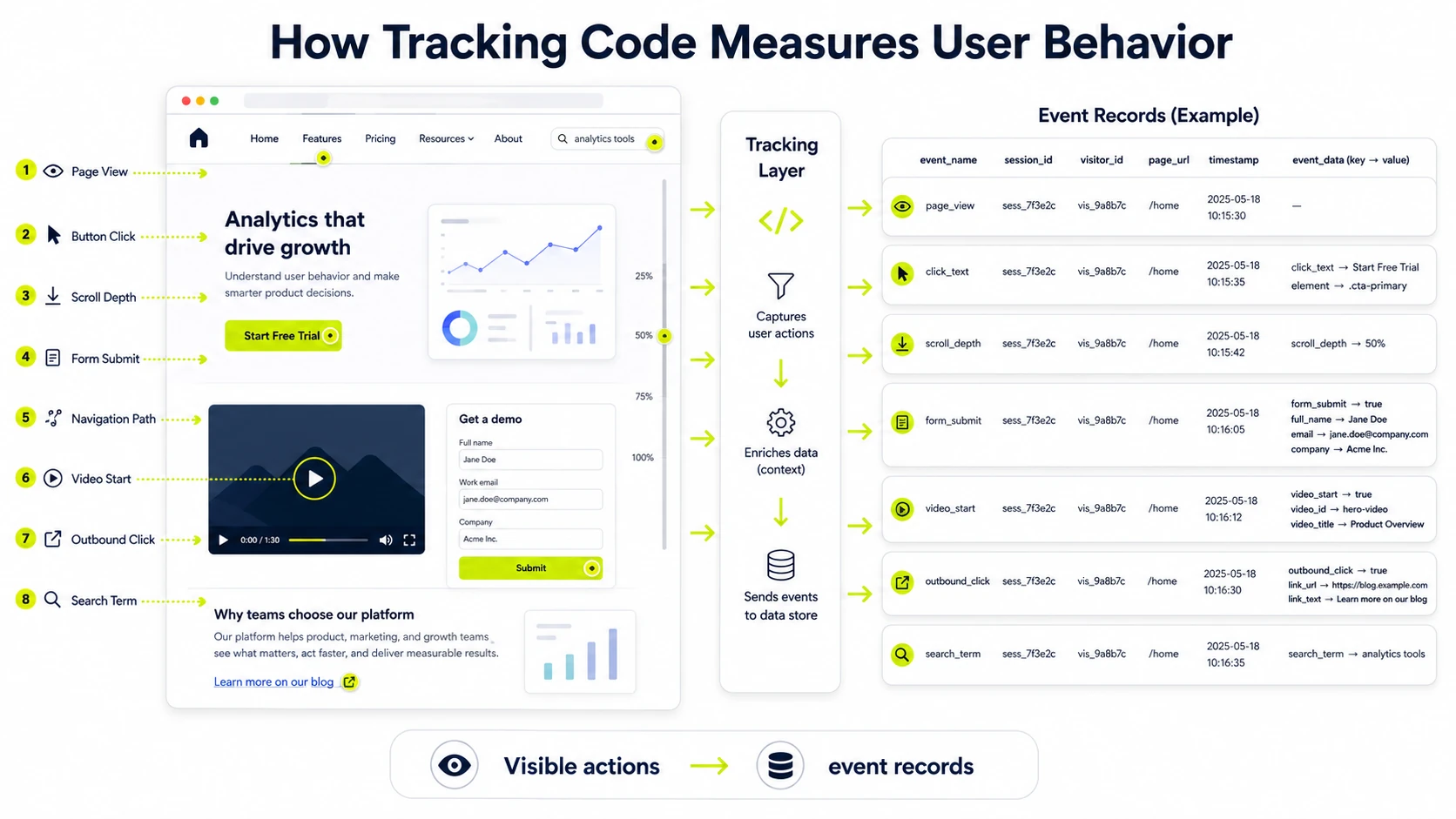
Tracking code measures user behavior by recording page views, clicks, scrolls, form interactions, navigation paths and engagement events tied to a session or visitor identifier. Behavioral measurement turns visible page actions into event records. The event schema defines which interactions matter: click_text, form_submit, scroll_depth, video_start, outbound_click or search_term.
How does tracking code measure conversions?
Tracking code measures conversions by firing a configured event when a user completes a target action such as a purchase, lead form, booking or signup. The event must contain enough detail for reporting, deduplication and attribution.
A conversion measurement setup usually includes these parts.
- A conversion event name, such as purchase, generate_lead or sign_up
- A trigger that fires only after the target action
- Parameters such as value, currency, item ID, form ID or lead type
- A report destination such as GA4 key event, Google Ads conversion or Meta event
- A QA check for duplicate events and missing parameters
How do tracking codes support attribution?
Tracking codes support attribution by connecting a visit or conversion to traffic source, campaign, referral, landing page and channel data. UTM parameters, referrer values, click IDs and conversion events create the path used by attribution reports. The model then assigns credit by source, medium, campaign and touchpoint logic.
How are multiple tracking codes managed?
Multiple tracking codes are managed through a tag manager, naming rules, trigger controls, load-order checks, consent settings and regular QA. Tag management reduces duplicate snippets, source-code clutter and conflicting firing rules.
Multiple tracking code management covers these controls.
- Use one tag management system where possible.
- Name tags, triggers and variables by platform, event and purpose.
- Keep page-view tags separate from conversion tags.
- Document consent requirements for analytics, advertising and CRM tags.
- Check load order, duplicate firing and event parameters after each release.
What is tracking-code double-firing?
Tracking-code double-firing happens when the same tag or event fires more than once and inflates page views, conversions or engagement metrics. Common causes include duplicate snippets, overlapping GTM triggers, platform auto-tracking plus manual events and repeated data layer pushes.
How do you verify tracking code?
Tracking code is verified by checking tag firing, browser network requests, debug tools, real-time reports, consent behavior and final event values. Verification confirms that the website sends the intended data and avoids duplicate or blocked measurement.
The tracking code QA process is listed below.
- Load the page in a clean browser session.
- Open the tag debugging tool, such as Tag Assistant or a platform preview mode.
- Confirm the intended tags fire once per matching action.
- Inspect browser network requests for the correct endpoint, ID and payload.
- Trigger test events, including page view, form submit and conversion actions.
- Compare debug output with real-time reports in GA4, HubSpot, Meta or Adobe.
- Test consent states and verify blocked tags remain blocked.
What tracking-code problems are common?
Common tracking-code problems include missing snippets, wrong placement, duplicate tags, blocked scripts, broken triggers, missing parameters and consent conflicts.
- Missing snippet on template variants or landing pages
- Duplicate GA4, Meta Pixel or CRM tags
- Trigger overlap that records the same event twice
- Data layer values missing on checkout or form pages
- Consent mode blocking expected analytics or advertising tags
- Ad blockers, browser restrictions and script errors that prevent requests
What privacy rules apply to tracking code?
Privacy rules for tracking code depend on the data collected, user location, industry, consent method and whether personal or sensitive data is shared with vendors. The relevant rule set changes when a website collects health data, financial data, personal identifiers, advertising IDs or cross-site audience signals.
Privacy checks for tracking code cover the following areas.
- Cookie and tracker disclosure in the privacy notice
- Consent or opt-out handling for analytics and advertising tags
- Personal data restrictions for form fields, URLs and event parameters
- Vendor disclosure for analytics, CRM and ad platforms
- Sensitive-data controls for health, finance and regulated industries
- Retention settings, deletion workflows and data minimization
What reports do tracking codes enable?
Tracking codes enable reports for traffic, engagement, conversions, campaign performance, audience behavior, attribution and data quality. The reporting layer depends on the event schema and the accuracy of the tags, triggers, parameters, consent signals and platform settings.
Common reports enabled by tracking codes are listed below.
- Traffic reports by source, medium, campaign and landing page
- Engagement reports by page, event, scroll depth and session quality
- Conversion reports by event name, value, channel and campaign
- Attribution reports by touchpoint, source and model
- Audience reports by behavior segment and remarketing rule
- Data quality reports for duplicate events, missing parameters and tag status
Is tracking code required for website analytics?
YES. Website analytics requires a tracking code, tag manager container, server-side endpoint or platform integration to collect website activity. An untracked page produces no client-side event data for analytics reports.
Can tracking code slow down a website?
YES. Tracking code can slow a website when several third-party scripts load, fire too early or block important page resources. Async loading, tag cleanup, trigger limits and container QA reduce performance impact.
Can tracking code work without cookies?
YES. Tracking code can work without cookies, but session recognition, attribution, remarketing and repeat-visitor measurement become less complete. Cookieless data measurement still records some events, page views and server requests under platform and consent limits.
Is tracking code tested before publishing?
YES. Tracking code testing before publishing confirms that tags fire once, events contain correct parameters and consent rules work. Debug mode, network requests and real-time reports provide the first QA pass.
Can one website use multiple tracking codes?
YES. One website can use multiple tracking codes when tags are managed with clear triggers, consent controls, naming rules and duplicate-event checks. A tag management system gives the safest structure for analytics, ad, CRM and verification tags.
Website data tracking code remains reliable when the same opening concepts return at the end: scripts, tags, pixels, tracking IDs, triggers, data layer values, consent signals and conversion events must connect to one measurement plan. Accurate reports depend on that complete path from source code to analytics property, ad platform, CRM record and dashboard output.

Written by
Zunnun Ahmed
Digital analytics consultant helping businesses make data-driven decisions. Specializing in GA4, GTM, conversion tracking, and marketing attribution to turn messy data into profitable growth strategies. Semantic SEO expert in the Koray Tuğberk Gübür methodology.