Website Event Tracking: Definition, Setup, QA and Data
Learn website event tracking with GA4, GTM, data layer setup, validation, privacy controls and reporting methods for cleaner data.
Zunnun Ahmed · Published · 19 min read
Website event tracking measures clicks, form submissions, downloads, video starts, scroll depth and purchase actions beyond pageviews. GA4 and GTM store these user actions with event names, timestamps, parameters and QA checks so analytics teams analyze engagement, conversion paths, privacy controls and reporting accuracy.
The same interaction data supports web analytics, product analytics and marketing attribution when event names, parameters and validation rules stay consistent across the tracking plan.
What Is Website Event Tracking?
Table of Contents
- Why Is Website Event Tracking Important?
- What Is the Difference Between Pageview Tracking and Event Tracking?
- What website interactions should be tracked as events?
- What Are Conversion Events in Website Event Tracking?
- How Does Website Event Tracking Support Conversion Rate Optimization?
- What Is an Event Taxonomy for Website Event Tracking?
- What Does a Website Event Tracking Plan Include?
- How Do You Implement Website Event Tracking?
- How Does Website Event Tracking Work in GA4 and Google Tag Manager?
- How Do You Choose a Website Event Tracking Tool?
- How Do You Validate Website Event Tracking?
- How Does Privacy Affect Website Event Tracking?
- Which Reports Are Built From Website Event Tracking Data?
- What Are Common Website Event Tracking Mistakes?
- How Is Website Event Tracking Documented and Maintained?
Website event tracking is analytics measurement for specific user actions on a website, including clicks, form submissions, downloads, video plays, scroll events and purchases. Each action becomes an analytics event with an event name, timestamp and parameters that describe the interaction context.
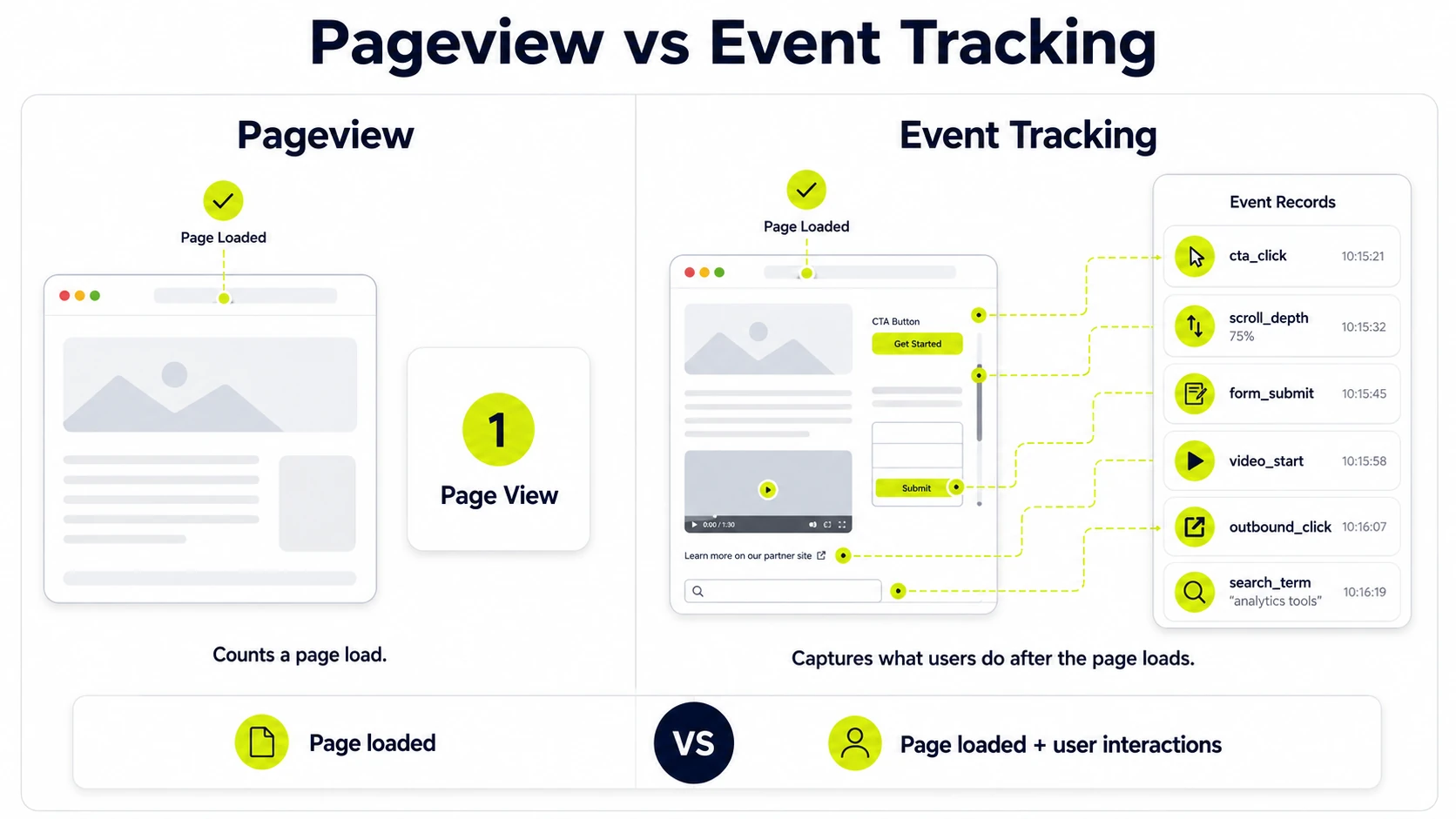
This user interaction tracking records behavior that pageview-only measurement misses. A page load confirms access to a URL. An event confirms that the visitor interacted with a button, file, form, video, product or checkout step.
How Does Website Event Tracking Measure User Interactions Beyond Pageviews?
Website event tracking measures beyond pageviews by recording what users do after a page loads, including CTA clicks, lead form submissions, video starts, section scrolls and add_to_cart actions.
The measurement platform stores those timestamped actions as event records. Event parameters such as button_text, form_id, page_location and product_id add the detail required for segmentation, funnel analysis and data quality checks.
Why Is Website Event Tracking Important?
Website event tracking is important because it connects observable user behavior to business, marketing and website performance decisions. It shows which interactions create conversions, which paths lose users and which page elements attract engagement without relying only on sessions or pageviews.
Main benefits include:
- Records conversion paths from first interaction to key event.
- Shows engagement depth through clicks, scroll depth, video starts and form activity.
- Identifies friction points in forms, checkout flows and content journeys.
- Improves marketing attribution by connecting campaigns to downstream actions.
- Creates cleaner reporting through defined event names and parameters.
How Does Event Tracking Help Understand Website User Behavior?
Event tracking explains user behavior by turning individual interactions into analyzable behavior signals. Click tracking, form submission tracking, scroll tracking and video play tracking show intent, hesitation, engagement and friction inside the user journey.
A behavior report built from events shows the difference between passive visits and active engagement. The data reveals where users start tasks, where they abandon tasks and which interactions correlate with conversion goals.
What Is the Difference Between Pageview Tracking and Event Tracking?
Pageview tracking records page loads, while event tracking records user actions inside or across pages. Pageviews describe where users went. Events describe what users did, which creates stronger analytics context for engagement depth, conversion behavior and on-page measurement.
The differences are:
|
Tracking type |
Primary measurement |
Best use |
|---|---|---|
|
Pageview tracking |
URL loads and screen views |
Traffic analysis, landing page reporting and content reach |
|
Event tracking |
Clicks, submissions, downloads, video actions and purchases |
Interaction analysis, funnels, conversion paths and CRO diagnostics |
|
Combined setup |
Page context plus action context |
Full web analytics reporting with stronger data interpretation |
What website interactions should be tracked as events?
Website interactions tracked as events include actions that signal intent, engagement, progress or conversion value. A focused tracking strategy captures meaningful actions rather than every small cursor movement or repeated low-value click.
High-value website interactions include:
- Button clicks: CTA clicks, navigation clicks and phone number clicks.
- Form submissions: lead forms, quote requests, newsletter forms and account forms.
- Content engagement: scroll depth, video starts, file downloads and site search usage.
- Ecommerce actions: view_item, add_to_cart, begin_checkout and purchase events.
- Support actions: chat opens, help article interactions and contact link clicks.
Which User Actions Are Most Useful for Event Tracking?
The most useful tracked actions are high-intent events tied to a measurable goal, including lead form submissions, checkout steps, CTA clicks, account signups, product engagement and download actions.
- Track macro conversions first: purchases, qualified leads, bookings and signups.
- Track micro conversions second: add_to_cart, product views, video views and resource downloads.
- Track friction signals third: form errors, failed submissions, checkout abandonment and repeated clicks.
- Track engagement events last: scroll depth, tab clicks, filters and site search.
What Are Conversion Events in Website Event Tracking?
Conversion events are tracked user actions that match a business goal, including purchases, lead submissions, booking requests, signups, quote requests or account creations. In GA4, selected conversion events appear as key events for conversion reporting.
A conversion event has a clear outcome value. A form_submit event records lead generation. A purchase event records ecommerce revenue. A sign_up event records account acquisition. These events connect analytics data to business goals.
What Are Micro Conversions in Website Event Tracking?
Micro conversions are smaller tracked actions that show progress toward a primary conversion. They do not equal the final business goal, but they reveal the steps that create intent before a lead, signup, booking or purchase.
- Newsletter signup before a sales inquiry.
- Product view before an add_to_cart event.
- Video view before a demo request.
- File download before a quote request.
- Account creation before a paid purchase.
How Does Website Event Tracking Support Conversion Rate Optimization?
Website event tracking supports conversion rate optimization by showing which interactions create progress and which interactions expose friction. Event data identifies form errors, checkout exits, low CTA engagement, scroll gaps and funnel drop-off points that affect conversion rate.
CRO analysis uses this interaction data to prioritize page changes. A/B testing, form revisions, CTA placement changes and checkout fixes become measurable because the same event schema records behavior before and after each change.
Which Tracked Events Identify Conversion Friction?
Tracked events that identify conversion friction are signals of hesitation, failed progress or repeated effort. These events show where users encounter blocked tasks, unclear interfaces, slow forms or checkout steps that reduce goal completion.
Events that often reveal conversion friction include:
- form_error events for invalid fields or failed submissions.
- begin_checkout without purchase completion.
- Rage click or repeated CTA click events.
- Low scroll depth on pages with important offers below the fold.
- Download clicks without later lead form submissions.
How Are Funnels Built From Website Event Tracking Data?
Funnels are built from event tracking data by arranging ordered event steps that represent progress toward a goal. Each step uses a defined event name and parameter set, then reporting calculates continuation, drop-off and completion across the sequence.
- Define the goal event, such as purchase, form_submit, book_demo or sign_up.
- Select the required preceding events, such as product_view, add_to_cart and begin_checkout.
- Apply matching parameters, such as page_location, product_id or form_id.
- Review drop-off between steps by source, device, landing page and user segment.
- Use the friction points to revise page elements, forms or checkout steps.
What Is an Event Taxonomy for Website Event Tracking?
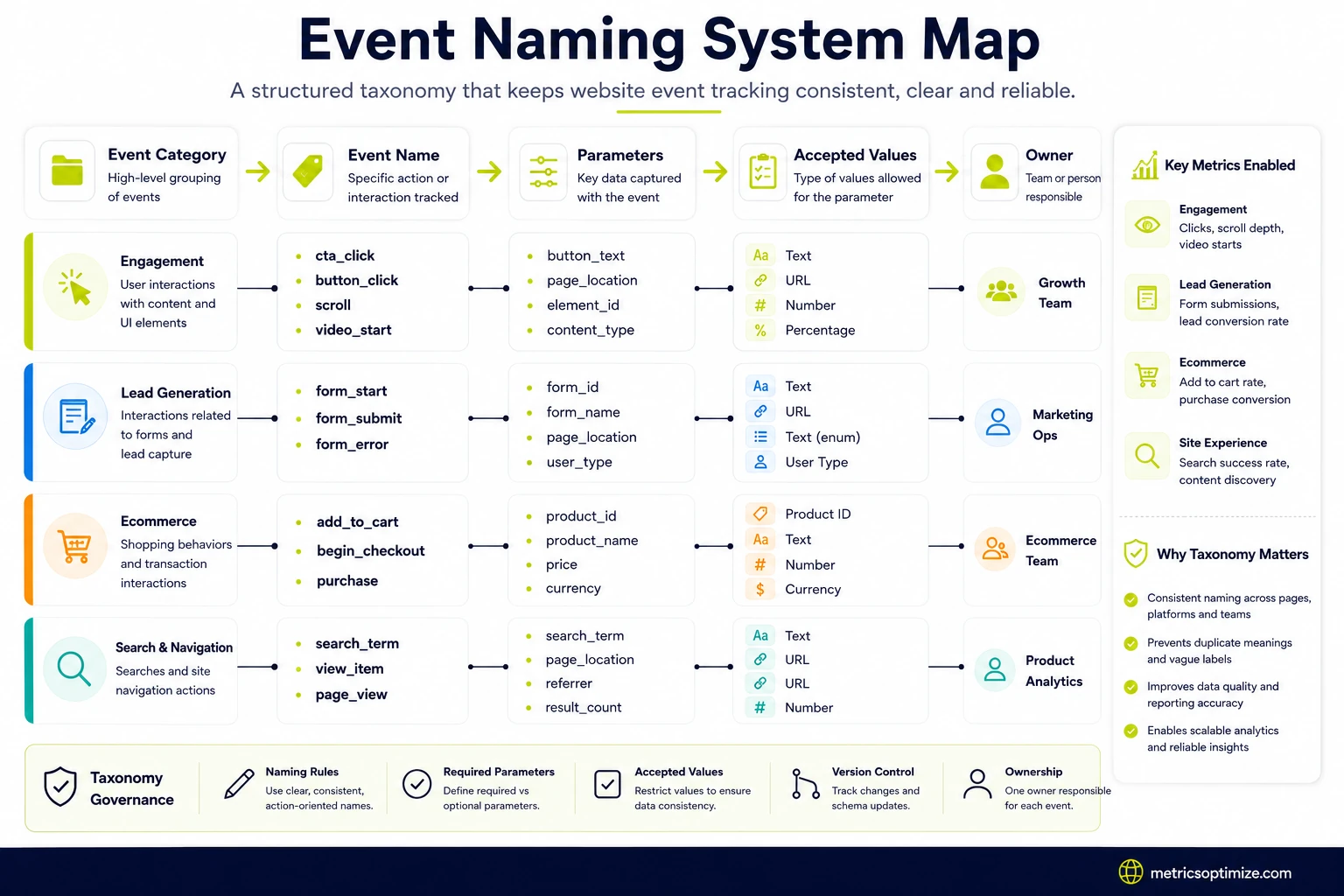
An event taxonomy is the classification system for event names, parameters, categories and rules in a tracking setup. It keeps analytics event tracking consistent across pages, platforms, reports and teams.
The taxonomy defines how events are named, which parameters belong to each event, which values are accepted and which owner maintains the schema. This governance prevents duplicate meanings, vague labels and reporting confusion.
How Are Website Events Named?
Website events are named with clear action-object labels that describe the tracked behavior. A consistent convention such as form_submit, file_download, video_start or add_to_cart gives analysts readable data and gives developers predictable implementation rules.
Website event names follow these rules:
- Use lowercase event names where the platform supports them.
- Use snake_case for multiword names, such as form_submit.
- Name the action first and the object second.
- Reserve key event names for business-critical outcomes.
- Document every event name in the tracking plan.
What Are Event Parameters in Website Event Tracking?
Event parameters are data fields attached to an event that describe the interaction context. They add the page, element, product, form, campaign or user-state detail required for segmentation and analysis.
A click event becomes more useful when parameters identify button_text, page_location and link_url. A form_submit event gains reporting value when form_id, form_name and form_type identify the submitted form.
What Does a Website Event Tracking Plan Include?
A website event tracking plan includes business goals, event names, parameter rules, implementation notes, validation status and ownership details. The plan converts measurement requirements into a buildable schema for GTM, GA4 and reporting teams.
A website event tracking plan includes:
- Business goal linked to each tracked action.
- Event name, event definition and expected trigger condition.
- Required parameters, accepted values and naming rules.
- Implementation location, such as GTM, data layer or platform code.
- QA status, reporting destination and maintenance owner.
How Does Website Event Tracking Fit Into a Measurement Plan?
Website event tracking fits into a measurement plan as the action-level layer that connects KPIs to measurable website behavior. The measurement plan defines objectives, while the event schema defines the user actions that prove progress toward those objectives.
For example, a lead generation KPI maps to form_start, form_submit and phone_click events. An ecommerce KPI maps to view_item, add_to_cart, begin_checkout and purchase events with revenue and product parameters.
How Do You Implement Website Event Tracking?
Website event tracking is implemented by converting the tracking plan into data layer events, GTM tags, trigger rules and GA4 event collection. The build works best when naming, parameters and validation criteria exist before tags are deployed.
The implementation sequence is:
- Define the measurement goal, event name, trigger condition and required parameters.
- Review GA4 enhanced measurement settings to avoid duplicate scroll, outbound click, video and file download events.
- Add a data layer event or use a reliable DOM-based trigger when a data layer event is unavailable.
- Create GTM variables that capture event values such as form_id, button_text and page_location.
- Configure the GA4 event tag with the correct Measurement ID and parameters.
- Test the interaction in GTM preview mode, GA4 DebugView and real-time reports.
- Record the final event behavior, QA result and owner in the event dictionary.
What Is the Role of a Data Layer in Website Event Tracking?
A data layer gives website event tracking a structured source of event names and parameter values. It passes event payloads from the website to Google Tag Manager or another tag management system without scraping unstable page elements.
A dataLayer.push() can include event, form_id, button_text, product_id, value and currency. GTM variables read those fields, triggers respond to the event name and GA4 receives a clean event record.
What Are Triggers and Tags in Website Event Tracking?
Triggers and tags define when tracking fires and where the data goes. In Google Tag Manager, a trigger contains the firing rule. A tag sends the event data to GA4, Google Ads, Meta or another measurement endpoint.
|
Component |
Function |
Example |
|---|---|---|
|
Trigger |
Defines the condition that fires measurement |
Click on a phone link or data layer event equals form_submit |
|
Tag |
Sends event data to a platform |
GA4 event tag with event name and parameters |
|
Variable |
Stores dynamic values for tags and triggers |
button_text, form_id, page_location or product_id |
What Is the Difference Between Client-Side and Server-Side Event Tracking?
Client-side event tracking runs in the user browser, while server-side event tracking routes event data through a server endpoint before it reaches analytics or advertising platforms. The difference affects control, browser exposure, latency and data governance.
|
Method |
Where collection occurs |
Main use |
|---|---|---|
|
Client-side tracking |
Browser, usually through GTM or site code |
Standard GA4 events, click tracking, form tracking and quick deployment |
|
Server-side tracking |
Server container or cloud endpoint |
First-party routing, data control, vendor governance and reduced browser dependency |
|
Hybrid tracking |
Browser plus server endpoint |
Conversion deduplication, consent-aware measurement and richer data control |
How Does Website Event Tracking Work in GA4 and Google Tag Manager?
Website event tracking works in GA4 and Google Tag Manager through a website action, GTM trigger, GA4 event tag and GA4 reporting record. GTM handles deployment logic. GA4 stores the collected event and parameters for analysis.
- A user completes an interaction, such as a form submission or button click.
- The website sends a data layer event or exposes a page interaction that GTM detects.
- A GTM trigger matches the condition and fires the GA4 event tag.
- The GA4 tag sends the event name, Measurement ID and parameters to GA4.
- GA4 DebugView, real-time reports and standard reports display the collected event.
How Do Custom Events Become Key Events or Conversions in GA4?
Custom events become GA4 key events after GA4 receives the event name and the event is marked as a key event in Admin settings. The event must collect correctly before conversion-style reporting displays reliable counts.
The workflow starts with a custom event such as form_submit. GA4 receives that event through GTM or site code. The admin marks the event as a key event, then reports use it for conversion analysis and attribution.
How Does GTM Preview Mode Validate Website Events?
GTM preview mode validates website events by showing which triggers matched, which tags fired and which variables contained the expected values. This diagnostic view catches broken firing rules before GA4 reporting depends on the data.
GTM preview mode checks:
- The expected trigger fires on the correct interaction.
- The GA4 event tag fires once, not multiple times.
- Variables contain correct values for form_id, button_text and page_location.
- Consent settings match the intended tag behavior.
- GA4 DebugView receives the same event name and parameters.
How Do You Choose a Website Event Tracking Tool?
A website event tracking tool is chosen by matching analytics goals, implementation resources, reporting needs, integrations and privacy requirements. The right platform records the required events, supports the required parameters and fits the reporting workflow.
Selection criteria include:
- Analytics goal: marketing reporting, product behavior analysis, ecommerce reporting or customer data collection.
- Implementation method: site code, Google Tag Manager, SDK, data layer or server-side endpoint.
- Reporting model: standard reports, funnel reports, cohort views, dashboards or data warehouse export.
- Privacy controls: consent handling, data retention, personal data controls and regional storage options.
- Integration scope: ad platforms, CRM, BI tools, customer data platforms and ecommerce systems.
Which Product Analytics Tools Support Website Event Tracking?
Product analytics tools that support website event tracking include GA4, Amplitude, Mixpanel, Piwik PRO and similar event-based analytics platforms. Each tool differs by reporting model, data governance, implementation method and product analysis depth.
- GA4: web analytics, campaign attribution, key events and audience reporting.
- Amplitude: product behavior analysis, funnels, cohorts and retention views.
- Mixpanel: product analytics, user flows, event properties and segmentation.
- Piwik PRO: privacy-focused web analytics, consent-aware tracking and reporting.
- Customer data platforms: event collection, identity resolution and downstream activation.
How Do You Validate Website Event Tracking?
Website event tracking is validated by confirming the correct interaction fires the correct event once with the correct parameters in the correct reporting destination. Validation covers GTM preview mode, GA4 DebugView, real-time reports and final reporting views.
Validation checks include:
- Trigger check: the firing condition matches the intended interaction.
- Tag check: the correct GA4 event tag fires once per action.
- Parameter check: expected values appear for event name, page, element and object.
- Consent check: tag behavior follows consent state rules.
- Reporting check: DebugView, real-time reports and standard reports show matching data.
How Do You Prevent Duplicate Events in Website Event Tracking?
Duplicate events are prevented by using exclusive trigger rules, single tag ownership, event ID logic where supported and QA checks across GTM and GA4. Duplicate collection inflates conversions, distorts funnel rates and weakens attribution analysis.
- Remove overlapping click triggers that fire for the same element.
- Avoid firing one event from both site code and GTM unless deduplication exists.
- Use event_id or transaction_id for supported conversion deduplication cases.
- Check preview mode for multiple tag fires on one interaction.
- Document tag ownership so teams do not rebuild the same event twice.
How Do You Maintain Data Quality in Website Event Tracking?
Data quality is maintained through consistent event schema, parameter validation, duplicate detection, documentation updates and periodic tracking audits. Clean event data depends on governance after launch, not only correct setup on implementation day.
- Use one event dictionary for event names, definitions and parameters.
- Validate new tags in preview mode before publishing.
- Review GA4 reports for sudden event count changes.
- Audit triggers after website template, form or checkout updates.
- Record changes in a tracking change log with owner and date.
How Does Privacy Affect Website Event Tracking?
Privacy affects website event tracking by controlling which data is collected, when tags fire, how users are identified and how long event records are retained. Consent, cookies, personal data limits and data minimization shape the tracking setup.
Privacy controls include:
- Consent settings define whether analytics or advertising tags fire.
- Cookie rules affect identifiers, sessions and returning user measurement.
- Personal data controls prevent sensitive values from entering event parameters.
- Consent mode adjusts Google tag behavior based on user consent state.
- Retention settings define how long user-level event data remains available.
How Are Users Identified in Website Event Tracking?
Users are identified in website event tracking through anonymous IDs, session IDs, cookies, device signals and optional user IDs. The identifier type affects session continuity, cross-device analysis, privacy exposure and identity resolution.
Anonymous identifiers support standard web analytics without naming a person. A logged-in user ID connects events across sessions when privacy rules and platform policies permit that use. Sensitive personal data stays outside event names and parameters.
Which Reports Are Built From Website Event Tracking Data?
Reports built from website event tracking data include conversion reports, funnel reports, engagement reports, segment reports and attribution reports. Each report answers a different question about behavior, progress, source quality or data reliability.
Useful reports from website event tracking data include:
- Conversion reports for key events such as leads, purchases and signups.
- Funnel reports for ordered steps from landing page to goal completion.
- Engagement reports for clicks, scroll depth, video actions and downloads.
- Segment reports by device, source, campaign, user type and landing page.
- Attribution reports that connect campaigns to downstream key events.
How Are Website Events Segmented for Analysis?
Website events are segmented for analysis by grouping event records by user, source, device, page, campaign, content type or conversion status. Segmentation turns raw interaction data into comparisons that explain behavior differences.
- Traffic source: organic search, paid search, email, referral and direct sessions.
- Device category: desktop, mobile and tablet behavior.
- User segment: new users, returning users, logged-in users or purchasers.
- Landing page: first page tied to later event completion.
- Conversion status: converters compared with non-converters.
How Does Event Tracking Support Marketing Attribution?
Event tracking supports marketing attribution by connecting campaign visits to downstream actions, not only sessions or pageviews. UTM parameters, traffic source dimensions, GA4 key events and Google Ads conversion tracking tags show which channels create leads, purchases, signups and assisted conversions.
This connection improves attribution analysis because the report uses action-level outcomes. A campaign with fewer sessions but more form_submit events has stronger lead value than a campaign with high traffic and low interaction depth.
What Are Common Website Event Tracking Mistakes?
Common website event tracking mistakes include vague event names, missing parameters, duplicate events, weak QA, undocumented changes and privacy errors. These mistakes reduce reporting accuracy and create conflicting interpretations across marketing, analytics and development teams.
Common measurement mistakes include:
- Using names such as click or submit without object context.
- Sending events without page, form, product or button parameters.
- Firing the same event from multiple tags or scripts.
- Publishing GTM changes without preview mode validation.
- Allowing website redesigns to break triggers without a tracking audit.
- Sending personal data in event names or parameter values.
- Leaving GA4 enhanced measurement enabled for interactions already tracked through custom GTM events.
- Missing cross-domain tracking when form, booking, checkout or payment journeys use more than one domain.
How Is Website Event Tracking Documented and Maintained?
Website event tracking is documented and maintained through an event dictionary, parameter schema, implementation notes, QA evidence, ownership records and change history. This documentation keeps digital analytics records readable after site releases, form changes and reporting updates.
- Document each event name, definition, trigger condition and business purpose.
- List required parameters, accepted values and reporting destinations.
- Record the GTM tag, trigger, variable and data layer source for each website data tracking event.
- Store QA evidence from preview mode, DebugView and real-time reports.
- Assign an owner and update the change log after website releases.
When Is Website Event Tracking Documentation Completed?
Documentation is completed before implementation so the team has defined event names, parameters, trigger rules and QA criteria before GTM tags or site-code events are built.
This order reduces rework, unclear labels and mismatched reporting logic. The event dictionary becomes the reference point for GTM configuration, GA4 key events, dashboard fields and future tracking audits.
How Does a Tracking Plan Reduce Event Naming Mistakes?
A tracking plan reduces event naming mistakes by assigning each event one approved name, one definition and one parameter set before deployment.
The naming convention keeps form_submit, file_download, video_start and purchase events consistent across reports. It also prevents separate teams from creating duplicate labels for the same user action.
Why Do Event Names and Parameters Follow a Consistent Naming Convention?
Event names and parameters follow a consistent naming convention because comparable data requires stable labels across pages, campaigns and reporting periods.
A stable convention protects data quality because analysts read the same event meaning in GA4, dashboards and tracking documentation. Consistent parameter names also reduce cleanup work in Looker Studio, BigQuery exports and attribution reports.
How Does Event Tracking Documentation Help Teams Debug Analytics Issues?
Event tracking documentation helps teams debug analytics issues by listing expected events, tag owners, trigger rules and parameter values.
Analysts and developers compare the expected schema with preview mode, DebugView and report output. This comparison identifies broken triggers, missing data layer values, duplicate tag fires and parameter mismatches faster than report review alone.
Why Is Website Event Tracking Reviewed After Website Changes?
Website event tracking review after site changes detects broken triggers, missing data layer values, duplicate tags and changed form behavior.
Redesigns, template changes, scripts and checkout updates alter the interactions that tags depend on. A post-release tracking audit protects conversion reports, funnel analysis and attribution data from silent collection errors.
How Does Outdated Tracking Documentation Cause Reporting Errors?
Outdated tracking documentation causes reporting errors when teams use old event meanings, retired parameters, wrong owners or missing change history.
Clean documentation keeps meaningful user actions beyond pageviews connected to GA4 events, Google Tag Manager validation and data quality. It also keeps the opening tracking plan aligned with the closing maintenance routine, creating one measurement record for event names, parameters, QA checks and reporting accuracy.

Written by
Zunnun Ahmed
Digital analytics consultant helping businesses make data-driven decisions. Specializing in GA4, GTM, conversion tracking, and marketing attribution to turn messy data into profitable growth strategies. Semantic SEO expert in the Koray Tuğberk Gübür methodology.