Google Ads Conversion Tracking: Setup, Tags and Testing
Set up Google Ads conversion tracking with 7 settings, Google tag components, GTM steps, testing checks and duplicate prevention.
Zunnun Ahmed · Published · 15 min read
Google Ads conversion tracking records business actions after ad interactions so advertisers measure conversions, optimize bidding and verify whether tags, events and conversion actions collect accurate data. The setup connects a conversion action to the Google tag, event snippet, conversion ID, conversion label and Tag Assistant validation results.
This guide covers setup, tags and testing for Google Ads conversion measurement. It does not cover general campaign management, ad copy, keyword planning or budget strategy.
What is Google Ads conversion tracking?
Table of Contents
- Why is Google Ads conversion tracking important?
- What types of conversions can Google Ads track?
- Which conversion settings matter most?
- Is it better to import conversions from GA4 or track them with the Google Ads tag?
- How do you set up Google Ads conversion tracking?
- Which advanced Google Ads conversion tracking options improve measurement quality?
- How do you test and verify Google Ads conversion tracking?
- Why is Google Ads conversion tracking not working?
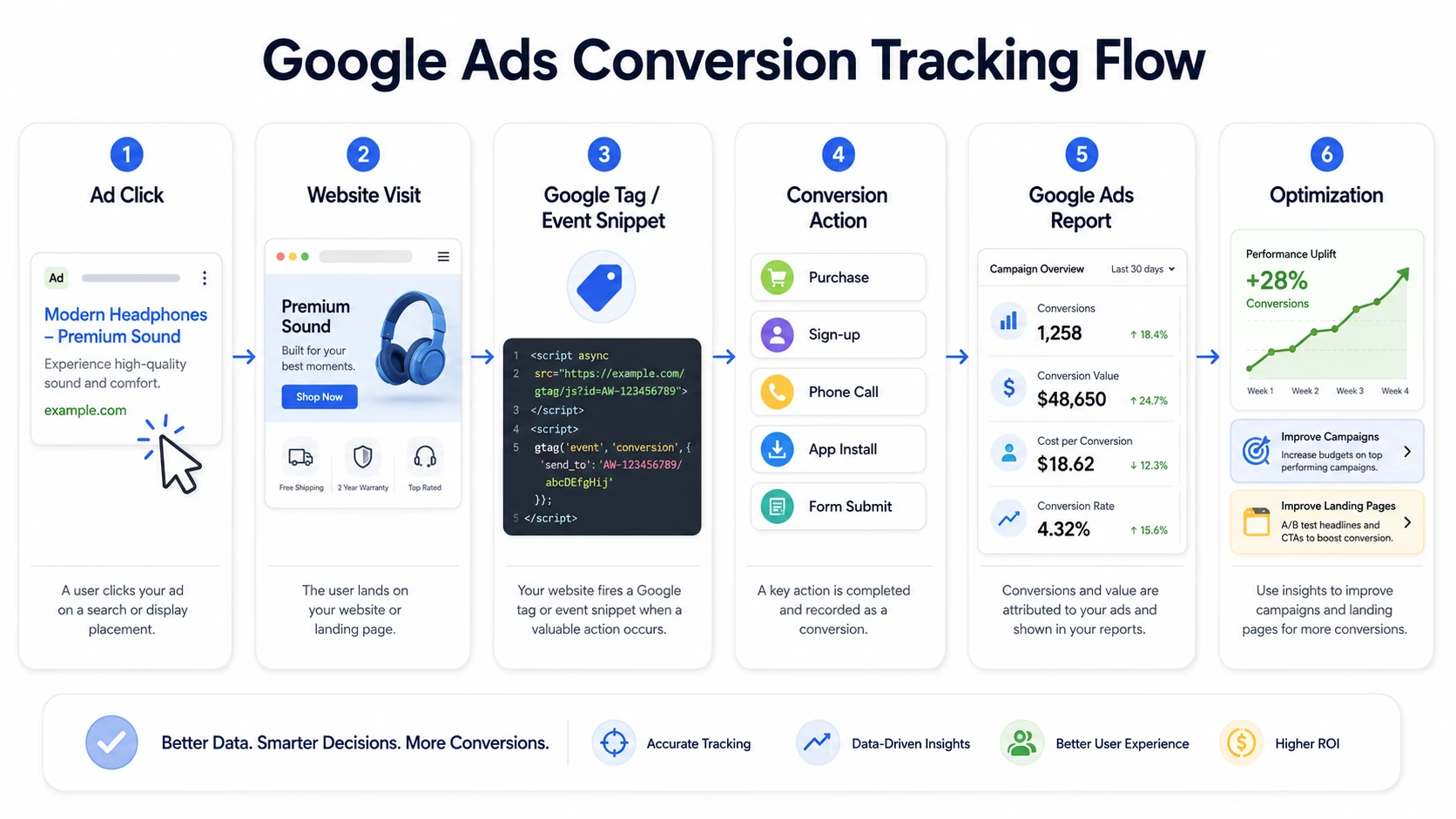
Google Ads conversion tracking is a measurement feature that records customer actions after Google Ads interactions, including purchases, sign-ups, calls, app installs and form submissions. A conversion action defines the activity, category, value, count rule, attribution setting and reporting status inside the Google Ads account.
Google ads conversion tracking usually fires from a Google tag or event snippet. App conversion tracking records installs or in-app events. Phone call tracking uses call reporting or a phone snippet. Offline conversion tracking imports CRM or sales outcomes tied to click identifiers.
How is Google Ads conversion tracking different from conversion rate optimization?
Google Ads conversion tracking measures whether conversions happened, while conversion rate optimization improves pages, offers, forms and user flows to increase the percentage of visitors who convert. Tracking produces measurement data; CRO changes the landing page experience, form design or user action path.
Why is Google Ads conversion tracking important?
Google Ads conversion tracking is important because it shows which ads, keywords, campaigns and landing pages produce business actions instead of clicks alone. This conversion measurement turns ad spend into ROI signals, campaign performance evidence, conversion value data and All conversions reporting.
The main benefits of Google Ads conversion tracking are listed below.
- ROI reporting connects ad spend to purchases, leads, calls and app events.
- Campaign performance analysis separates high-converting traffic from vanity metrics.
- Conversion value data supports value-based bidding and ROAS evaluation.
- All conversions reporting includes primary conversions, secondary actions and cross-device signals where eligible.
- Broken tags, missing identifiers and wrong triggers become visible during diagnostics.
How does conversion tracking support Smart Bidding?
Conversion tracking supports Smart Bidding by sending conversion count and conversion value signals that Google Ads uses for target CPA, target ROAS and maximize conversions strategies. The bidding system evaluates auction-time context against prior conversion signals, attribution data and value history.
Clean primary actions improve bidding inputs. Duplicate conversions, missing values, imported wrong GA4 events and delayed offline uploads distort CPA and ROAS calculations.
Is Google Ads conversion tracking required for Smart Bidding?
Yes. Conversion tracking is required for Smart Bidding strategies that optimize for conversions or conversion value because the bidding system relies on conversion signals, target CPA data, target ROAS data and campaign-level goal settings.
What types of conversions can Google Ads track?
Google Ads tracks website actions, app actions, phone calls, offline conversions and local actions when each activity is configured as a conversion source or conversion action. These conversion types cover web forms, ecommerce purchases, call leads, app installs and CRM sales outcomes.
Google Ads tracks these conversion types.
- Website actions: purchases, lead forms, subscriptions, page-view goals and button clicks.
- App conversions: installs and in-app events from Firebase, app analytics or supported app integrations.
- Phone calls: calls from ads, calls to a website number and mobile click-to-call events.
- Offline conversions: CRM sales, qualified leads and store outcomes imported with click identifiers and timestamps.
- Local actions: store visits, directions and location-related actions where Google reports eligibility.
What is a conversion action in Google Ads?
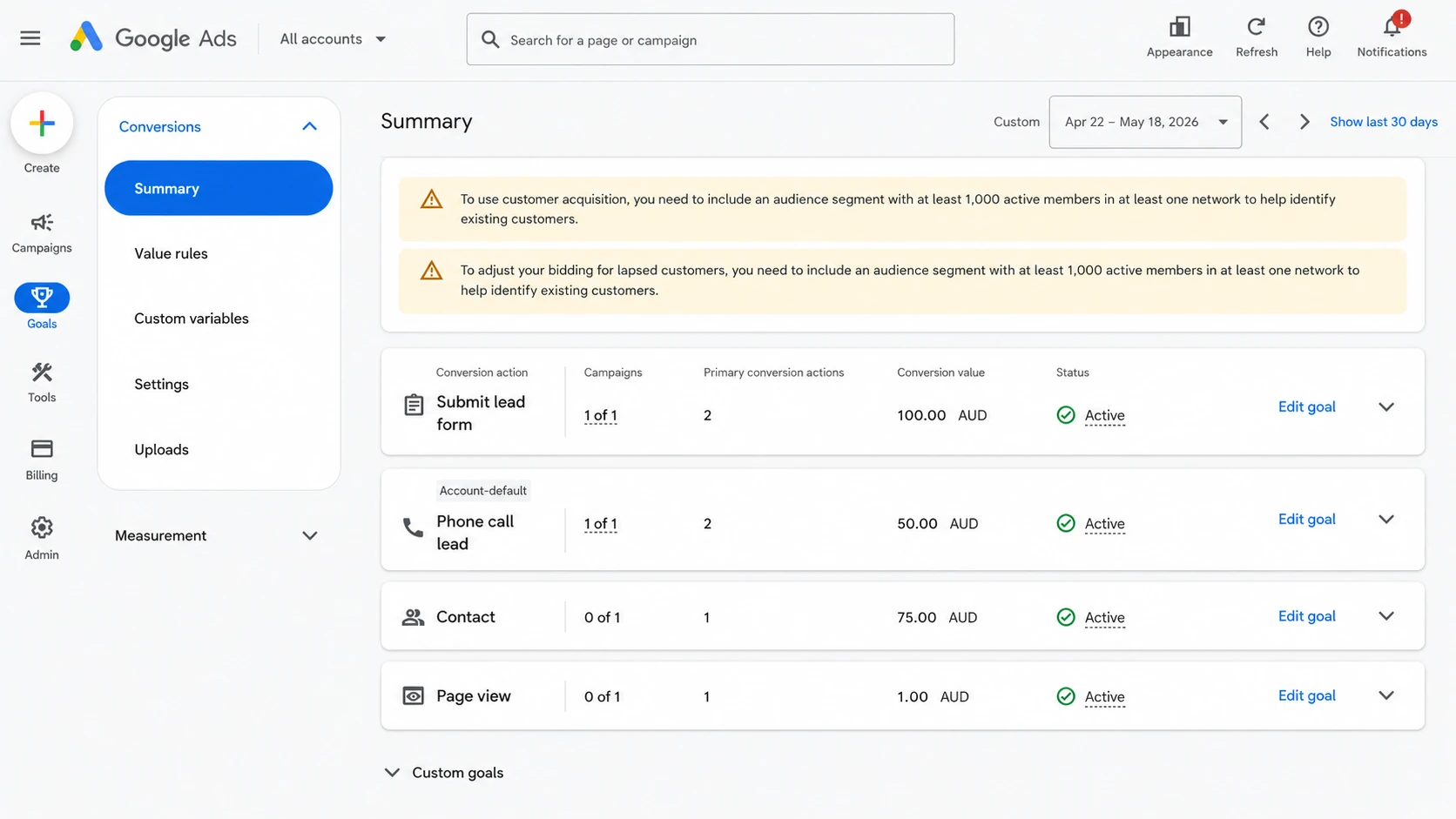
A conversion action is a specific customer activity that an advertiser defines as business-relevant, such as a purchase, lead form submission, phone call or app install. Separate conversion actions keep different goals, values, count settings and primary or secondary statuses distinct.
How can form submissions, calls, ecommerce, app and offline conversions be tracked?
Form submissions, calls, ecommerce purchases, app events and offline sales use different conversion sources, tags or imports inside Google Ads. The method depends on where the action happens, which identifier exists and whether the result occurs online or after a sales process.
The main tracking methods are listed below.
- Form submission: fire an event snippet or GTM tag after verified submission, not on a failed validation attempt.
- Phone call: configure a phone call conversion action, call reporting or a phone snippet for website calls.
- Ecommerce purchase: pass purchase event, transaction-specific value, currency and transaction ID from the data layer.
- App install or in-app event: connect Firebase, app analytics or a supported app conversion source.
- Offline sale: import conversion name, timestamp, value and click identifier from CRM or sales data.
Which conversion settings matter most?
The most important Google Ads conversion settings are goal type, action optimization, value, count, conversion window, attribution model and account-default inclusion. These settings control which actions affect bidding, how revenue appears and how credit is assigned after ad interactions.
|
Setting |
What it controls |
When to use it |
|---|---|---|
|
Goal type |
Conversion category, such as purchase, lead, signup or phone call |
Use the category that matches the business outcome. |
|
Action optimization |
Primary or secondary status for bidding and reporting |
Use primary for bidding goals and secondary for observation. |
|
Value |
Fixed value, dynamic value or no value |
Use dynamic value for ecommerce and fixed value for lead estimates. |
|
Count |
One conversion or every conversion per ad interaction |
Use every for purchases and one for lead submissions. |
|
Conversion window |
Time after an interaction when a conversion receives credit |
Match the normal sales cycle and reporting requirement. |
|
Attribution model |
Credit assignment across eligible ad interactions |
Use data-driven attribution where account eligibility supports it. |
|
Account-default inclusion |
Whether the action appears in default conversion columns |
Include core business goals; exclude diagnostics and minor events. |
What are the Google tag, conversion tag, event snippet, conversion ID and conversion label?
Google Ads conversion tracking uses a sitewide Google tag, a conversion event tag, an event snippet, a conversion ID and a conversion label. These components identify the account, identify the action, trigger the event and send measurement data to Google Ads.
|
Component |
Function |
Placement |
|---|---|---|
|
Google tag |
Collects sitewide signals and supports Google measurement |
Placed on site pages or through GTM. |
|
Conversion tag |
Sends conversion data when the selected action occurs |
Placed in GTM or website code. |
|
Event snippet |
Records the specific conversion event for manual gtag setups |
Placed on event page or fired from event code. |
|
Conversion ID |
Identifies the Google Ads account or conversion setup |
Copied from Google Ads into tag fields. |
|
Conversion label |
Identifies the specific conversion action |
Copied into GTM tag or event snippet. |
|
Phone snippet |
Replaces or measures website phone calls where configured |
Placed on pages with tracked phone numbers. |
Does Google Ads conversion tracking need a conversion ID and conversion label?
Yes. A Google Ads conversion tag deployed through GTM or a manual event snippet requires a conversion ID and conversion label so Google Ads connects the tag hit to the correct account and conversion action.
Can Google Ads conversion tracking record duplicate conversions?
Yes. Google Ads conversion tracking records duplicate conversions when a confirmation page reloads, a tag fires more than once or the same purchase lacks a unique transaction ID. Transaction ID, order ID logic and stricter tag firing rules prevent duplicate purchase credit.
Can GA4 conversions be imported into Google Ads?
Yes. GA4 conversions import into Google Ads after the Google Ads account and GA4 property are linked and auto-tagging is enabled. In GA4, the event marked as a key event becomes eligible for Google Ads import.
Is it better to import conversions from GA4 or track them with the Google Ads tag?
Use the Google Ads tag for Ads-only bidding accuracy and import GA4 conversions when the account requires a shared Analytics source for cross-channel reporting. The better choice depends on bidding dependence, attribution needs, auto-tagging and Analytics governance.
|
Use case |
Strength |
Limitation |
|---|---|---|
|
Google Ads tag |
Direct Ads measurement, conversion ID and conversion label control |
Less cross-channel context than GA4 reporting. |
|
GA4 import |
Shared key event source across channels and Analytics reports |
Imported data follows GA4 collection and attribution differences. |
|
Both in account |
Primary and secondary roles separate bidding from observation |
Wrong primary settings create duplicate or mixed optimization signals. |
For Smart Bidding, use the source with the cleanest primary conversion signal. Use secondary status for comparison imports, diagnostic events and non-bidding conversion actions.
How do you set up Google Ads conversion tracking?
Google Ads conversion tracking setup starts by creating a conversion action, selecting the conversion source, configuring settings, installing the Google tag or event snippet and verifying tag status. This setup process is the centrepiece because every later testing and reporting step depends on it.
The basic setup process follows these steps.
- Open Google Ads and create a conversion action under Goals, Conversions and Summary.
- Select the conversion source: website, app, phone call, import or local action where available.
- Configure category, name, value, count setting, conversion window, attribution model and primary or secondary status.
- Install the Google tag and event snippet directly, deploy the Google Ads Conversion Tracking tag in GTM or connect a supported platform integration.
- Trigger the conversion action in a test session and confirm the tag status through Tag Assistant, GTM Preview mode and Google Ads diagnostics.
How do you set up Google Ads conversion tracking with Google Tag Manager?
Google Tag Manager setup uses a Google Ads Conversion Tracking tag, conversion ID, conversion label, optional value fields and a trigger that fires on the selected conversion event. GTM also requires a conversion linker tag for click identifier storage.
- Create a Google Ads Conversion Tracking tag in the GTM container.
- Paste the conversion ID and conversion label from the Google Ads conversion action.
- Map value, currency and transaction ID variables for purchase or lead-value tracking.
- Add a conversion linker tag on all pages.
- Attach a trigger such as thank-you page, form_submit event, purchase event, phone click or custom data layer event.
- Use Preview mode to confirm one tag fire, then publish the container.
Can Google Ads conversion tracking work without Google Tag Manager?
Yes. Google Ads conversion tracking works without Google Tag Manager through direct Google tag and event snippet installation in website code or through an approved platform integration. Direct installation requires the same conversion ID, conversion label, event trigger and validation checks.
Which triggers fire a conversion tag?
A conversion tag fires only when the selected business action happens, such as a thank-you page load, verified form submission, purchase event, phone click or custom data layer event. Trigger choice controls data quality and duplicate prevention.
- Thank-you page URL after a verified lead form.
- form_submit event after server-side or client-side validation.
- purchase event with value, currency and transaction ID.
- Phone click trigger for tracked click-to-call actions.
- Custom data layer event for AJAX forms, Calendly embeds and multi-step flows.
Which advanced Google Ads conversion tracking options improve measurement quality?
Advanced Google Ads conversion tracking options improve measurement quality when standard tags lose signal because of privacy controls, offline sales cycles or browser restrictions. Enhanced conversions, consent mode, server-side tagging, offline imports and modeled conversions extend measurement beyond a basic tag fire.
What are enhanced conversions?
Enhanced conversions improve Google Ads measurement by sending hashed first-party customer data from website tags or offline lead imports to Google in a privacy-safe way. The feature uses SHA-256 hashing for user-provided data such as email address, phone number or address fields.
Enhanced conversions improve attribution accuracy when browser restrictions or cookie loss reduce match quality. The data source still requires consent alignment, correct field capture and validation in Google Ads diagnostics.
How does consent mode affect conversion tracking?
Consent mode affects conversion tracking by changing how Google tags behave when users grant or deny ad_storage and analytics_storage consent. Granted consent permits normal storage behavior; denied consent restricts cookies and sends cookieless pings where configuration supports them.
Basic consent mode blocks Google tags until consent is granted. Advanced consent mode loads tags before consent state resolution and adjusts behavior based on consent signals. Modeled conversions depend on eligibility, consent signal volume and Google Ads modeling requirements.
When is server-side conversion tracking used?
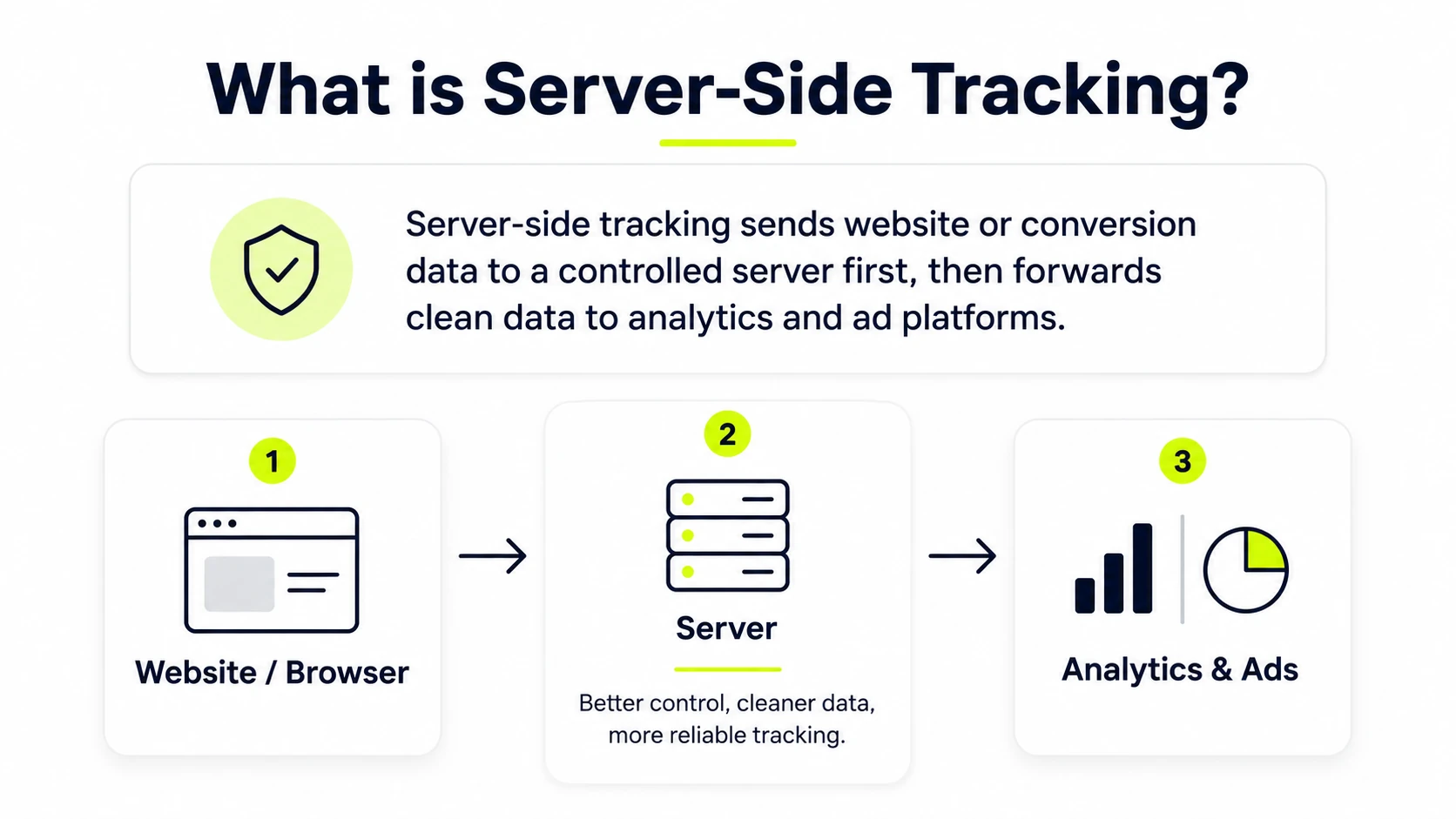
Server-side conversion tracking is used when a website requires stronger data routing control, first-party endpoints, improved tag resilience or cleaner conversion signal quality. The setup usually relies on server GTM, a first-party endpoint and defined routing rules.
- Use server-side tagging for stricter control over outbound vendor requests.
- Use sGTM when browser restrictions reduce client-side tag reliability.
- Use first-party endpoints when cookie behavior and request routing require tighter governance.
- Use server events when offline imports and client-side events require deduplication logic.
How do you test and verify Google Ads conversion tracking?
Google Ads conversion tracking is verified by checking tag installation, conversion action triggering, Tag Assistant results and conversion action status in Google Ads. Validation confirms the tag fires once, sends the correct identifiers and appears in diagnostics.
Use this validation checklist before relying on conversion data.
- Confirm the Google tag, GTM container or platform integration loads on the target page.
- Complete the test conversion action in a clean browser session.
- Review Tag Assistant and GTM Preview mode for one correct tag fire.
- Check conversion ID, conversion label, value, currency and transaction ID variables.
- Review Google Ads conversion diagnostics and tag status after processing.
- Compare test timing against delayed reporting expectations before treating the setup as broken.
How do you test Google Ads conversion tracking?
Test Google Ads conversion tracking by opening the site in Tag Assistant or GTM Preview mode, completing the conversion action and confirming that the correct tag fired once. The test also checks trigger rules, identifiers, event values and duplicate behavior.
- Start Tag Assistant or GTM Preview mode.
- Complete the conversion action, such as a purchase test or verified form submission.
- Confirm one Google Ads Conversion Tracking tag fire with the expected conversion ID and label.
- Check value, currency and transaction ID fields where revenue tracking exists.
- Review Google Ads diagnostics after data processing.
Where can you see conversion data in Google Ads?
Conversion data appears in Google Ads under Goals, Conversions and Summary and in reporting columns such as Conversions, All conversions, conversion value and conversion rate. Campaign, ad group, keyword and asset views show performance by reporting level.
- Goals menu: conversion action setup, status and diagnostics.
- Campaign reports: conversion columns, value columns and conversion rate.
- Ad group and keyword reports: conversion distribution by targeting unit.
- Asset reports: conversion performance by creative asset where available.
- Attribution reports: path and credit assignment views.
Why is Google Ads conversion tracking not working?
Google Ads conversion tracking usually fails because the tag is missing, the wrong trigger fires, the conversion ID or label is incorrect, consent blocks cookies or the conversion action remains unverified. Troubleshooting starts with tag evidence before report interpretation.
Common causes of broken conversion tracking are listed below.
- Tag inactive: Google Ads has not detected a recent eligible tag fire.
- Unverified status: the conversion action has not received enough valid activity after setup.
- Wrong trigger: the tag fires on page load, failed form submissions or repeated confirmation visits.
- Incorrect conversion ID or label: the event routes to the wrong account or action.
- Consent mode restrictions: denied ad_storage or analytics_storage changes cookie and ping behavior.
- Duplicate tag deployment: direct code, GTM and platform integrations send overlapping events.
- Delayed reporting: Google Ads processing time creates a gap between test action and visible data.
How can duplicate conversions be prevented?
Duplicate conversions are prevented by sending a unique transaction ID, limiting tag firing rules, using the correct count setting and testing reload behavior on confirmation pages. Deduplication matters most for ecommerce purchases, recurring lead forms and imported conversions.
- Pass transaction ID or order ID with every purchase event.
- Use one count for lead actions and every count for purchases.
- Restrict confirmation page triggers to completed actions.
- Block reload-based repeat fires where possible.
- Audit GA4 imports and Google Ads tags for overlapping primary actions.
Can Google Ads conversion tracking work without a thank-you page?
Yes. Google Ads conversion tracking works without a thank-you page when the conversion tag fires on a verified click, form submission, custom event or data layer event. This approach fits AJAX forms, modal forms, embedded schedulers and single-page applications.
Can Google Ads conversion tracking track button clicks?
Yes. Google Ads conversion tracking tracks button clicks when the click is configured as a conversion action and the event snippet or GTM trigger fires on that button. Use validation logic when the click starts a form rather than completing it.
Does Google Ads conversion tracking work with Shopify?
Yes. Google Ads conversion tracking works with Shopify through the Google and YouTube app, custom conversion ID and label setup or GTM-based ecommerce tracking. Purchase events, add to cart events and checkout started events require platform-specific validation.
Can Google Ads conversion tracking use dynamic conversion values?
Yes. Google Ads conversion tracking uses dynamic conversion values when the tag receives transaction-specific value, currency and transaction ID from the website, data layer or ecommerce platform. Ecommerce purchases and lead value scoring depend on clean variable mapping.
Can Google Ads conversion tracking be affected by consent mode?
Yes. Google Ads conversion tracking is affected by consent mode because tag behavior, cookie use and conversion modeling depend on the user's consent choices. ad_storage and analytics_storage states change how the Google tag and event snippet collect signals.
A consent review ties the user's storage choice to the conversion action, Google tag behavior, event snippet payload, conversion ID routing and Tag Assistant diagnostics. This closing check repeats the setup, tags and testing loop used to verify whether conversion actions collect accurate data.

Written by
Zunnun Ahmed
Digital analytics consultant helping businesses make data-driven decisions. Specializing in GA4, GTM, conversion tracking, and marketing attribution to turn messy data into profitable growth strategies. Semantic SEO expert in the Koray Tuğberk Gübür methodology.