Website Traffic: Definition, Types, Sources and GA4 Reports
Learn 6 traffic types, 8 GA4 reports, 9 metrics, channel checks, landing page analysis and mistakes in website traffic reviews for GA4.
Zunnun Ahmed · Published · 12 min read
Website traffic represents the visits and interactions a website receives from users across organic, paid, direct, referral, social and campaign channels. Strong analysis connects users, sessions, traffic acquisition, landing pages and GA4 reports to engagement, conversion and source quality.
This content explains definition, traffic types, sources, measurement, GA4 reports, metrics, quality signals, competitor checks, growth actions and analysis mistakes in that order.
What is website traffic?
Table of Contents
Website traffic is the volume of users and sessions that visit and interact with a website over a selected reporting period. In web analytics, traffic includes visitors, pageviews, views, events, source data and engagement signals. A traffic report connects those measures to a date range so the same website is compared against a stable baseline.
Why is website traffic important?
Website traffic is important because it shows audience demand, channel visibility and conversion opportunity for pages, campaigns and offers. The main reasons website traffic is important are listed below.
- Brand visibility: search, social, referral and direct visits show whether people find the website.
- Lead generation: qualified sessions create form submissions, calls, signups and purchases.
- Conversion measurement: traffic tied to key events shows which visits produce outcomes.
- Marketing ROI: source / medium data connects visits to spend, revenue and pipeline.
- Audience demand: repeated traffic growth signals rising interest in the topic, product, or service.
What is good website traffic?
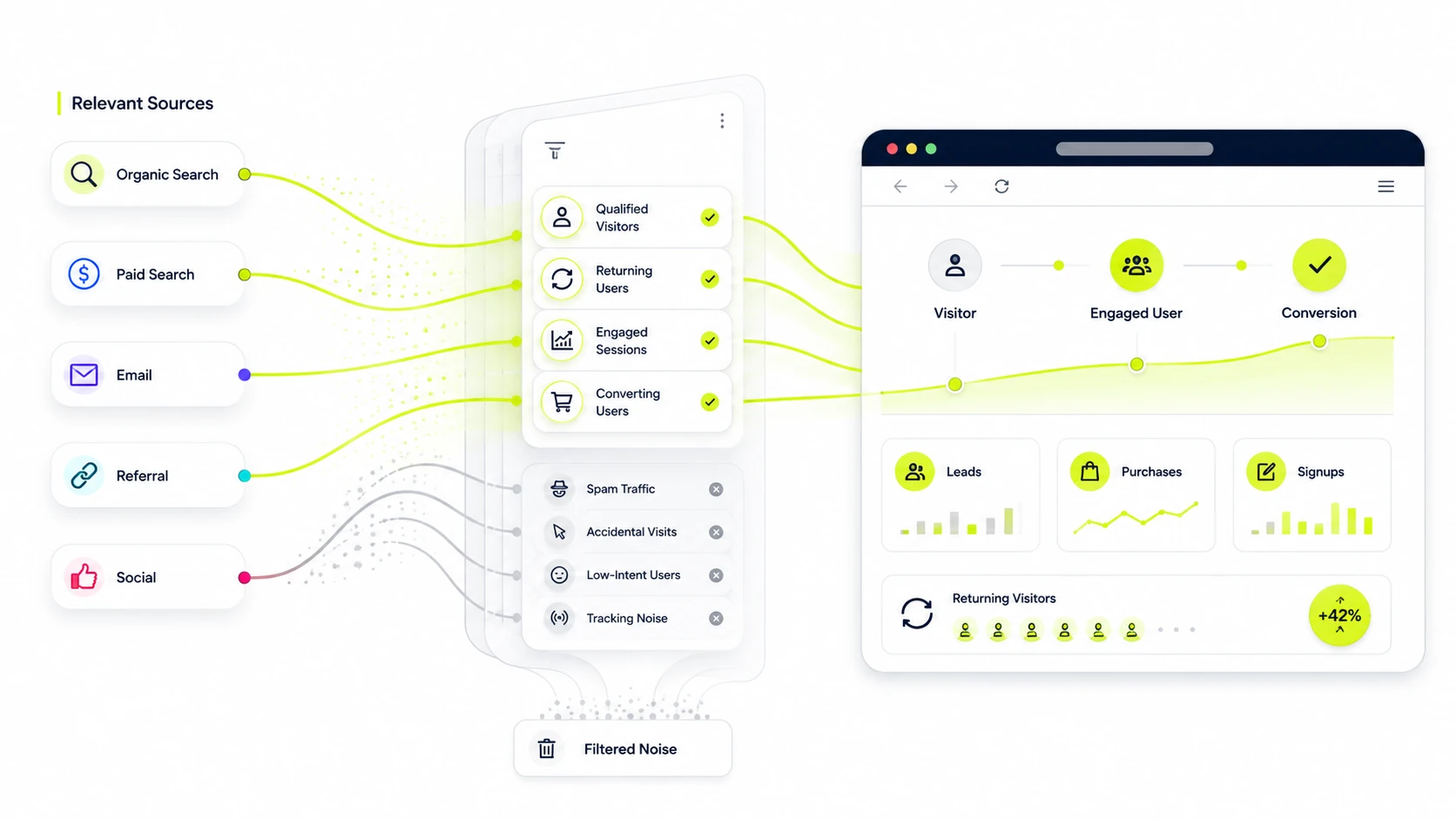
Good website traffic is qualified visitor activity from relevant users who engage with pages and complete business actions. A strong traffic pattern contains source relevance, returning users, engagement rate, conversion rate and low noise from spam or accidental visits. High visit volume with weak engagement indicates poor intent matching or a tracking problem.
What are the main types of website traffic?
The main types of website traffic are organic, paid, direct, referral, social and email traffic. Traffic types classify how visitors arrive and give acquisition data a usable reporting structure. The main types of website traffic are listed below.
- Organic search: unpaid visits from search engines such as Google Search and Bing.
- Paid search: ad clicks from Google Ads, Microsoft Ads, or another paid search platform.
- Direct traffic: visits with no clear referrer, including typed URLs, bookmarks and untagged sources.
- Referral traffic: sessions from links on other websites, directories, partners, or publishers.
- Social traffic: visits from social platforms such as LinkedIn, Facebook, X, Reddit and YouTube.
- Email traffic: visits from newsletters, lifecycle emails and campaigns tagged with UTM parameters.
What are the main sources of website traffic?
The main sources of website traffic are search engines, ad platforms, social networks, email campaigns, referral websites, direct visits and AI referral surfaces. A source is the platform, website, campaign, or referrer that sends the session. The main website traffic sources are listed below.
- Google Search and Bing: organic search visits grouped by source / medium.
- Google Ads and Microsoft Ads: paid clicks grouped by campaign, medium and keyword.
- Social media platforms: social sessions from profile links, posts, ads and videos.
- Email platforms: newsletter and automation traffic tracked with UTM campaign values.
- Referral websites: publishers, directories, partner pages and review sites.
- Direct visits: typed URLs, bookmarks and traffic with missing referrer data.
- AI referral surfaces: sessions from AI search, chat products, answer engines and cited links.
How is website traffic measured?
Website traffic is measured through analytics tags, event collection, users, sessions, views, source dimensions and conversion data inside a reporting period. The core website traffic measurements are listed below.
- Users: people, browsers, or devices identified by the analytics platform.
- Sessions: groups of interactions recorded within a visit window.
- Views or pageviews: page_view events that show content consumption.
- Engaged sessions: sessions that meet GA4 engagement criteria.
- Traffic source: source / medium, channel group, campaign and referrer dimensions.
- Conversions or key events: actions such as form_submit, purchase, signup, click_to_call, or demo_request.
How can you track website traffic?
Website traffic tracking starts with a measurement tag or GTM container that sends page_view events, traffic source data and campaign parameters to GA4. The basic steps to track website traffic are listed below.
- Create or confirm the GA4 property and web data stream.
- Install the Google tag directly or deploy it through Google Tag Manager.
- Verify page_view, session_start and user_engagement events in Realtime and DebugView.
- Tag campaigns with UTM source, medium, campaign, term and content values.
- Connect Search Console for organic query and landing page context.
- Review consent mode settings and excluded referrals before reporting.
How do you check website traffic in Google Analytics 4?
Website traffic in GA4 is checked through Reports, Acquisition, Traffic acquisition, Engagement, Pages and screens and Landing page reports. Google Analytics Help describes Traffic acquisition as session-scoped and User acquisition as user-scoped. Follow these steps to check website traffic in GA4.
- Open Google Analytics and select the correct GA4 property.
- Go to Reports, then Acquisition, then Traffic acquisition.
- Use Session default channel group, Session source / medium, or Session campaign as the primary dimension.
- Compare sessions, users, engaged sessions, engagement rate, key events and total revenue.
- Open Engagement, then Pages and screens to review page-level views and engagement.
- Open Engagement, then Landing page to review the first page of each session.
Which GA4 reports show website traffic?
The GA4 reports that show website traffic are Realtime, Reports snapshot, Acquisition overview, Traffic acquisition, User acquisition, Pages and screens, Landing page and Explore. The GA4 reports that show website traffic are listed below.
- Realtime: current users, events and source activity from the last active period.
- Reports snapshot: summary cards for users, views, key events and acquisition.
- Acquisition overview: acquisition summary across traffic source groups.
- Traffic acquisition: session-scoped source, medium, campaign and channel data.
- User acquisition: first-user source, medium, campaign and channel data.
- Pages and screens: page-level views, users, engagement and key events.
- Landing page: first page of the session with traffic and engagement metrics.
- Explore: custom segments, funnels, paths and free-form traffic analysis.
Which website traffic metrics matter most?
The website traffic metrics worth tracking are users, sessions, views, engagement rate, bounce rate, average engagement time, conversions, conversion rate and source / medium. The most important website traffic metrics to track are listed below.
- Users: the size of the measured audience.
- Sessions: the number of visits recorded in the reporting period.
- Views: the number of page_view or screen_view events.
- Engagement rate: the share of sessions that meet engagement criteria.
- Bounce rate: the share of sessions that fail engagement criteria in GA4.
- Average engagement time: active time with the page or app in focus.
- Conversions or key events: the count of completed target actions.
- Conversion rate: the share of sessions or users that convert.
- Source / medium: the dimension that connects traffic to the acquisition path.
What is the difference between users, sessions and pageviews?
Users, sessions and pageviews differ by person-level activity, visit-level activity and page-level activity. One user can create multiple sessions. One session can include multiple views.
|
Metric |
Meaning |
When to use it |
|---|---|---|
|
Users |
People, browsers, or devices identified by the analytics platform. |
Use users to estimate audience size and returning visitor behavior. |
|
Sessions |
Visit-level interaction groups within a defined session window. |
Use sessions to analyze acquisition, engagement and campaign performance. |
|
Pageviews or views |
Page loads or page_view events recorded by the tracking tag. |
Use views to analyze content consumption and page-level interest. |
What do engagement rate and bounce rate show about traffic quality?
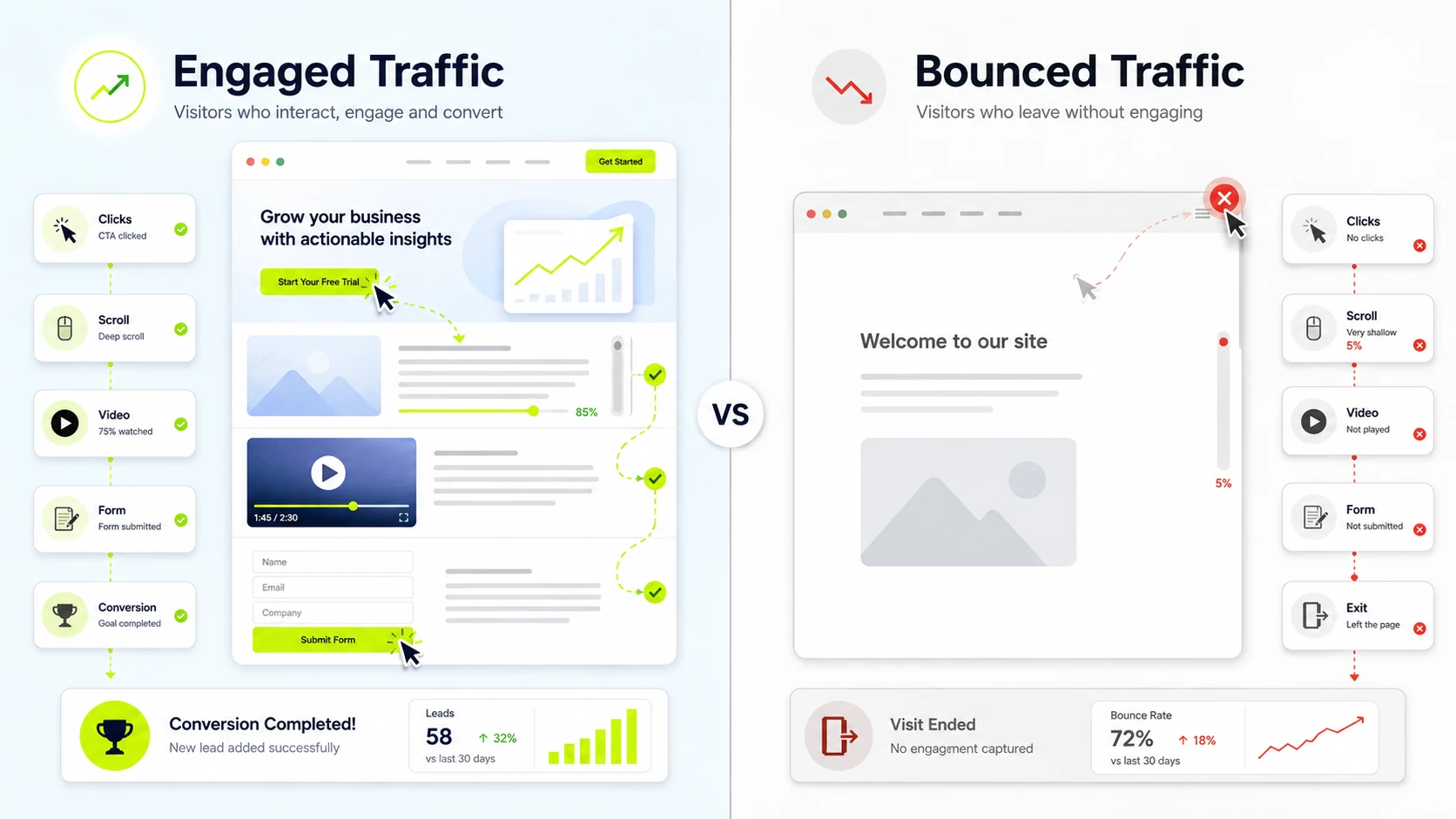
Engagement rate and bounce rate show the share of traffic that produces meaningful interaction versus sessions without engagement. Google Analytics Help defines bounce rate in GA4 as the percentage of sessions that were not engaged sessions. Engagement rate equals engaged sessions divided by sessions; bounce rate is the non-engaged share. Read both metrics by channel, landing page and intent.
How do you analyze website traffic by channel?
Website traffic by channel is analyzed by comparing users, sessions, engagement rate, conversions and conversion rate across acquisition groups. Use the following steps to analyze website traffic by channel.
- Open GA4 Reports, Acquisition and Traffic acquisition.
- Select Session default channel group as the primary dimension.
- Compare organic search, paid search, direct, referral, social, email and unassigned traffic.
- Review users, sessions, engagement rate, key events, conversion rate and revenue.
- Separate brand, nonbrand, campaign and remarketing traffic where UTM data allows it.
- Record the channel with high volume but low conversion as a testing priority.
How do you analyze website traffic by landing page?
Website traffic by landing page is analyzed by comparing session entry pages, engagement, conversions and traffic sources for each first-page visit. Use the following checks to analyze traffic by landing page.
- Open the GA4 Landing page report or create an Explore table with Landing page plus query string.
- Compare sessions, users, engagement rate, key events and conversion rate.
- Add Session source / medium or Session default channel group as a secondary dimension.
- Find pages with high entrances and weak engagement, low conversion, or irrelevant source mix.
- Compare page intent with the keyword, campaign, or referrer sending the visit.
- Prioritize updates on pages with high sessions and measurable business actions.
How does website traffic support conversion rate optimization?
Website traffic supports conversion rate optimization by showing where qualified visitors arrive, engage, hesitate and convert across channels and landing pages. Traffic analysis identifies pages with high sessions and low conversions, forms with weak completion and channel segments with strong intent. CRO uses that evidence for test prioritization, funnel analysis, A/B testing and page updates.
How do you check competitor website traffic?
Competitor website traffic is checked with third-party tools that estimate visits, top pages, traffic sources, keywords and trends. The basic steps to check competitor website traffic are listed below.
- Enter the competitor domain in Similarweb, Ahrefs, Semrush, or another traffic analysis platform.
- Review estimated visits, organic traffic, paid traffic, referral sources and top pages.
- Compare keyword rankings, backlink sources, ad visibility and content categories.
- Check traffic trends over several reporting periods instead of one month.
- Use several tools and treat the range as a benchmark, not exact analytics data.
How accurate are website traffic checker tools?
Website traffic checker tools are directional estimates, not exact analytics records, because competitor data comes from panels, clickstream sources, keyword databases and modeled calculations. Accuracy improves on larger sites with more observable signals and falls on small sites, private channels, untagged campaigns, or niche traffic. Use the range across Similarweb, Ahrefs and Semrush as a benchmark.
What common website traffic analysis mistakes hurt decisions?
Common website traffic analysis mistakes are reading total visits alone, ignoring intent, missing bot traffic, using weak date ranges and leaving findings unactioned. The common website traffic analysis mistakes to avoid are listed below.
- Relying on total visits: segment traffic by channel, landing page, device and intent.
- Ignoring conversions: connect sessions to key events, revenue, leads, or pipeline.
- Using weak date ranges: compare equivalent periods and account for seasonality.
- Missing bot traffic: inspect referrers, hostnames, engagement time and location spikes.
- Mixing user and session scope: separate User acquisition from Traffic acquisition in GA4.
- Ignoring landing pages: review entry pages that receive traffic but fail to convert.
- Skipping UTM governance: standardize source, medium and campaign naming.
- Leaving findings unactioned: assign each finding to a test, fix, or reporting note.
Why is relying only on total website traffic a mistake?
Relying only on total website traffic is a mistake because total visits hide quality, source mix, qualified leads and conversion outcomes. In digital analytics, total traffic can rise while engaged sessions, lead quality and revenue fall. A stronger review separates traffic by channel, intent, landing page, device and conversion value.
Why is website traffic segmented by channel and intent?
Website traffic is segmented by channel and intent because organic, paid, direct, referral and social visits carry different expectations and conversion likelihood. Web analytics metrics like informational traffic often reads or compares, while commercial traffic often checks price, proof, availability, or forms. Channel segmentation turns one traffic count into separate acquisition patterns.
How often is website traffic reviewed?
Website traffic is reviewed weekly for trend monitoring, monthly for performance analysis and daily during launches, campaigns or traffic incidents. Weekly review catches anomalies, tracking breaks and channel shifts. Monthly review compares performance against the prior period, the same period last year and campaign goals.
What checks explain a sudden website traffic drop?
A sudden website traffic drop is checked by reviewing tracking status, affected channel, affected pages, indexing, rankings, seasonality and recent site changes. Check these areas first when website traffic drops suddenly.
- Data tracking issue: confirm the GA4 tag, GTM container and consent signals still fire.
- Channel loss: compare organic, paid, direct, referral, social and email traffic.
- Page loss: identify landing pages with the largest session decline.
- Search visibility: review Search Console clicks, impressions, indexing and ranking changes.
- Site changes: inspect redirects, deployments, robots.txt, noindex tags and broken templates.
- External timing: compare holidays, seasonality, campaigns and known algorithm updates.
How can you identify bot or spam traffic in analytics?
Bot or spam traffic appears as sudden spikes, strange referrers, zero engagement, unusual locations, suspicious hostnames and sessions without conversions. Common signs of bot or spam traffic in analytics are listed below.
- Large session spikes from one city, country, device, or browser version.
- Referral traffic from unrelated domains, spam referrers, or fake campaign values.
- High sessions with zero engagement time, no scrolls and no key events.
- Unassigned or direct traffic that appears in bursts without a campaign cause.
- Hostnames that do not match the website or approved tracking environment.
- Session patterns that vanish after internal traffic, developer traffic and known bots are excluded.
How are website traffic insights turned into actions?
Website traffic insights become actions when a pattern is tied to a business goal, assigned to an owner, tested and measured against a baseline. Turn website traffic insights into actions with this process.
- Identify the pattern: channel growth, page decline, poor engagement, or conversion gap.
- Connect the pattern to a business goal such as lead quality, revenue, signup volume, or content demand.
- Choose one action: update a landing page, fix tracking, change budget, refresh content, or test a form.
- Assign an owner and a review date.
- Measure the result against the baseline using users, sessions, traffic acquisition, landing pages, GA4 reports, engagement and conversion context.

Written by
Zunnun Ahmed
Digital analytics consultant helping businesses make data-driven decisions. Specializing in GA4, GTM, conversion tracking, and marketing attribution to turn messy data into profitable growth strategies. Semantic SEO expert in the Koray Tuğberk Gübür methodology.